Development
Youtube ... Quora ...Google search ...Google News ...Bing News
- Development ... Notebooks ... AI Pair Programming ... Codeless ... Hugging Face ... AIOps/MLOps ... AIaaS/MLaaS
- AI Solver ... Algorithms ... Administration ... Model Search ... Discriminative vs. Generative ... Train, Validate, and Test
- Algorithm Administration ... DevSecOps ... CML ... Model Monitoring ... Prompt Injection Attack ... AI Verification and Validation
- Analytics ... Visualization ... Graphical Tools ... Diagrams & Business Analysis ... Requirements ... Loop ... Bayes ... Network Pattern
- Conversational AI ... ChatGPT | OpenAI ... Gemini | Google ... Claude | Anthropic ... Bing | Microsoft ... Siri | Apple ... Meta AI/Manus | Meta ... Perplexity ... Grok | SpaceXSI ... Ernie | Baidu ... DeepSeek ... Qwen | Alibaba
- Libraries & Frameworks Overview ... Libraries & Frameworks ... Git - GitHub and GitLab ... Other Coding options
- Strategy & Tactics ... Leadership ... Project Management ... Best Practices ... Checklists ... Project Check-in ... Evaluation ... Measures ... Benchmarks
- Risk, Safety, Compliance and Regulation ... Ethics ... Privacy ... Law ... AI Governance ... AI Verification and Validation
- Smart Cities
- Telecommunications ... Computer Networks ... 5G ... Satellite Communications ... Quantum Communications ... Smart Cities ... Digital Twin ... Internet of Things (IoT) ... AI Broadcast; Radio, Stream, TV ... Space-based Data Centers
- Agents/Assistants ... Agent Catalog ... Personal Companions ... Negotiation ... Productivity ... Email ... Web Automation ... Robotic Process Automation (RPA) ... LangChain
- Data Science ... Governance ... Preprocessing ... Exploration ... Interoperability ... Master Data Management (MDM) ... Bias and Variances ... Datasets
- Spreadsheets ... Documents ... Slides ... Database; Vector & Relational ... Graph ... Wiki
- Data Quality ...validity, accuracy, cleaning, completeness, consistency, encoding, padding, augmentation, labeling, auto-tagging, normalization, standardization, and imbalanced data
- Large Language Model (LLM) ... Multimodal ... Foundation Models (FM) ... Generative Pre-trained ... Transformer ... Attention ... GAN ... BERT
- Python ... GenAI w/ Python ... JavaScript ... GenAI w/ JavaScript ... TensorFlow ... PyTorch
- Gaming ... Game-Based Learning (GBL) ... Security ... Generative AI ... Games - Metaverse ... Quantum ... Game Theory ... Design
- Prompt Engineering (PE) ...PromptBase ... Prompt Injection Attack
- Artificial Intelligence (AI) ... Generative AI ... Machine Learning (ML) ... Deep Learning ... Neural Network ... Reinforcement ... Learning Techniques
- Google Natural Language
- World Models
- Service Capabilities
- AI Marketplace & Toolkit/Model Interoperability
- Artificial General Intelligence (AGI) to Singularity ... Curiosity ... Emergence ... Moonshots ... Explainable AI ... Automated Learning
- Immersive Reality ... Metaverse ... Omniverse ... Transhumanism ... Religion ... Versions of Yourself
- Symbiotic Intelligence ... Bio-inspired Computing ... Neuroscience ... Connecting Brains ... Nanobots ... Molecular ... Neuromorphic ... Evolutionary/Genetic
- Learning Techniques
- Differentiable Programming
- Humor ... Writing/Publishing ... Storytelling ... Broadcast ... Journalism/News ... Podcasts ... Books, Radio & Movies - Exploring Possibilities
- TransmogrifAI - workflows on Spark | Salesforce ... GitHub
- Graphpipe | Oracle
- Kite works with the top Python editors; Atom, PyCharm, Sublime, VS Code and Vim. Historical. Kite shut the service down in late 2022. Do not start a new install on this link.
- Machine Learning vs Traditional Programming | Oleksii Kharkovyna - Towards Data Science - Medium
- Track: Solving Software Engineering Problems with Machine Learning | Cyril Magnin III - QCon.ai
- Re-imagining developer productivity with AI-assisted tools | Amanda Silver - Microsoft ...AI-assisted IntelliSense GPT-2 transformer. Foundational 2019 post. Later Copilot work grew out of this line, not out of classic IntelliSense rules.
- Smart modeling tools - AI to help you model better | Jordi Cabot - Modeling Languages
- A Great Model is Not Enough: Deploying AI Without Technical Debt | DataKitchen - Medium
- Machine Learning for Big Code and Naturalness | ML4code ...Research on machine learning for source code.
- 6 Ways AI Transforms Software Development | Mariya Yao - MetaMaven
- Towards a DSL for AI Engineering Process Modeling | Sergio Morales - MOdeling LAnguages
- Bill Gates: People Don’t Realize What’s Coming | Somnath Singh - Medium
- AlphaCode | Google DeepMind ... capable of writing computer programs at a competitive level.
- Introducing Devin, the first AI software engineer | Cognition ... And setting a new state of the art on the SWE-bench coding benchmark. Read the 2024 claim next to later independent benchmarks. Early "solves X% of SWE-bench" headlines were sensitive to the harness, the time limit, and whether the test patch leaked. Devin is still an active product in 2026, and Cognition folded the Windsurf editor into it as Devin Desktop in June 2026. The benchmark sentence is not a standing warranty.
- Evaluating Large Language Models Trained on Code | Mark Chen et al. - arXiv, 2021 The original Codex paper. HumanEval was the unit test benchmark that defined this generation.
- Codex changelog | OpenAI Primary log for the 2025 agent product that reused the Codex name: CLI, IDE extension, desktop app, skills, and coding-specialized model snapshots such as GPT-5.2-Codex.
- TerpreT: A Probabilistic Programming Language for Program Induction | Alexander L. Gaunt et al., Microsoft Research, 2016 Corrects the NLP-platform description lower on this page. TerpreT is a DSL for inductive program synthesis.
- Amazon Q Developer | AWS Successor name for CodeWhisperer as of the April 2024 rebrand. IDE plugin support ends on 30 April 2027, with AWS pointing new agentic work at Kiro.
- Introducing Prism | OpenAI, 27 January 2026 Free science-writing workspace with GPT-5.2 in the document. Covered in its own section below. No separate wiki page.
- Introducing Manus 2.0 | Manus, 28 September 2026 Cascade harness, Cloud Computer, and Manus Studio. Covered below.
- LibreChat | LibreChat-AI Self-hosted multi-model chat. Covered below.
- Sharly AI product | Sharly Chat across uploaded documents with citations. Covered below.
- Le Chat | Mistral AI Mistral's own chat app. The model family stays on Mistral.
- Veo | Google DeepMind Video model with native audio. Used from Google AI Studio.
- Google Labs Experiment shelf for Flow and other previews. Covered below.
- DreamStudio Stability's image app. The company page is Stability AI.
- Bing Image Creator and Microsoft Designer Image side of Bing.
- Evidence, standards, and status updates (2025 to 2026):
- Measuring the Impact of Early-2025 AI on Experienced Open-Source Developer Productivity | J. Becker, N. Rush, E. Barnes, D. Rein - METR, July 2025 Randomized trial: 16 maintainers, 246 tasks, 19 percent slower with AI while believing they were faster.
- We are Changing our Developer Productivity Experiment Design | METR, 24 February 2026 Follow-up that leaned toward a speedup but was undermined by selection effects.
- DORA Report Finds AI Is an Amplifier in Software Development, But Trust Remains Low | InfoQ Summary of Google Cloud's 2025 State of AI-assisted Software Development report.
- Stack Overflow survey finds developers wary of AI tools | IT Brief, October 2026 2026 Developer Survey results on agent use and verification-based trust.
- Octoverse 2025 | GitHub 80 percent of new developers used Copilot in their first week; TypeScript became the most used language.
- Why SWE-bench Verified no longer measures frontier coding capabilities | OpenAI, 23 February 2026 Why the most quoted coding benchmark was retired by its own creator.
- Linux Foundation forms Agentic AI Foundation for MCP, goose, and AGENTS.md | SD Times, December 2025 Neutral home for the protocols coding agents now share.
- We Have a Package for You! A Comprehensive Analysis of Package Hallucinations by Code Generating LLMs | J. Spracklen et al. - USENIX Security 2025 The study behind "slopsquatting."
- 2025 GenAI Code Security Report | Veracode 45 percent of 80 security-sensitive tasks produced a known flaw across 100+ models.
- Amazon Q Developer IDE plugins end of support | AWS Official end date and the Kiro migration path.
- Firebase Studio sunset and project migration | Google Dates for the Firebase Studio shutdown and migration into AI Studio or Antigravity.
- Measuring the Impact of Early-2025 AI on Experienced Open-Source Developer Productivity | J. Becker, N. Rush, E. Barnes, D. Rein - METR, July 2025 Randomized trial: 16 maintainers, 246 tasks, 19 percent slower with AI while believing they were faster.
Building software when part of the work is done by a model: completing a line, drafting a function, searching a repository, running a test, or training a predictor from a table. It is also the holding page for chat, document, image, and video offerings that do not have their own article yet. Those offerings are written up in their own sections under "Offerings without a separate page." They are not new wiki pages.
Traditional programming states the rules. You write the branches, and the computer follows them. Machine learning states examples and a loss, and a fitting procedure proposes the rules. Generative coding sits in between. The human still owns the specification, but a language model trained on code proposes the next tokens, sometimes the next file, sometimes a pull request. The 2021 Codex paper (Chen et al.) showed that a GPT model fine-tuned on public GitHub code could pass a non-trivial fraction of hand-written unit tests (HumanEval). GitHub Copilot productized that idea inside the editor. By 2025 and 2026 the same idea had a second form: an agent with a terminal, a browser, and permission to edit many files, judged by whether tests pass rather than by whether the suggestion looks plausible.
The people and labs that set the early terms are still the right names. OpenAI and GitHub (Microsoft) for Codex and Copilot. Google DeepMind for AlphaCode, published in Science in 2022, which sampled many programs and filtered them with tests until Codeforces performance landed near the human median. Amazon for CodeWhisperer, later renamed Amazon Q Developer and then succeeded by Kiro. Anthropic for Claude's coding use and, later, Claude Code. Cognition for Devin (2024), sold as a ticket-to-pull-request agent. Replit, Cursor, Sourcegraph Cody, Tabnine, and a long list of open clones filled the editor around them. Salesforce's TransmogrifAI and Oracle's GraphPipe belong to the earlier "ML as a library workflow" layer, not the chat layer. Keep both. A Spark pipeline that featurizes a table and a model that writes the pipeline are different tools that often sit in one project.
The problem is the same one software engineering always had, made sharper. Most of a developer's day is not inventing an algorithm. It is reading, wiring, renaming, testing, and explaining. Models are fast at the wiring and careless about the invariant you did not type. The mechanism that makes them useful is prediction plus a checker: the model proposes, a compiler, a test, a type checker, or a human diff decides. Where there is no checker, speed just hides defects.
What changed in 2025 and 2026. Three things. First, the agent loop went mainstream. GitHub's Octoverse 2025 counted more than a million pull requests authored by the Copilot coding agent between May and September 2025, and OpenAI reported Codex passing four million weekly developers in April 2026. Second, the plumbing standardized. In December 2025 Anthropic's Model Context Protocol (MCP), OpenAI's AGENTS.md, and Block's goose became founding projects of the Linux Foundation's Agentic AI Foundation. Third, the evidence got more honest and more confusing. METR's randomized trial found experienced open-source maintainers 19 percent slower with early-2025 tools while they believed they were faster; its 2026 follow-up pointed toward a speedup but could not measure it cleanly, because developers increasingly refused to work without AI. Andrej Karpathy named the casual end of the spectrum "vibe coding" in February 2025: describe the app, accept the changes, run it, and stop reading the diff. Most of this page is about why you should keep reading the diff.
We had a deal, programmers are supposed to automate everyone else's jobs, not automate our jobs.
The joke still holds, with a narrower reading. The jobs that got automated first were completion, boilerplate, and first drafts. Ownership of behavior, security, and release did not move. A team that treats the model as a junior who never gets a review will ship the junior's bugs at the senior's speed.
Mechanisms
Several mechanisms stack. You can use one without the others. Products that hide the stack are harder to debug.
1. Next-token completion in an editor. The model sees the cursor, the open file, and often other open files or a retrieval index over the repo. It proposes a suffix. You accept with a keystroke. Copilot, Tabnine, and the original CodeWhisperer are this mechanism. Quality tracks context. A function with a clear name and a failing test already written is a better prompt than an empty file. The model does not know your unstated convention unless that convention appears in the context window or in an instructions file.
2. Chat grounded in the repo. You ask a question in natural language. The tool retrieves snippets (embeddings, keyword search, or an agent that opens files) and answers or edits. Sourcegraph Cody grew up on this retrieval story: the hard part of a large monorepo is finding the sibling implementation, not inventing a new algorithm. Chat answers can cite the wrong version of an API. Click through.
3. Generate, execute, revise. The model writes code, a sandbox or your machine runs it, the traceback goes back into the prompt. The original OpenAI code interpreter, local interpreters, and later coding agents all do this. It is the difference between a suggestion and a loop. Chen et al. already measured pass@k, the chance that one of k samples passes tests. Agents raise k by spending time, not only by sampling blindly. They still fail when the test is wrong, when the test is gamed, or when the behavior you care about is not what the test checks.
4. Sample and filter, the AlphaCode pattern. For a contest problem, generate a large set of programs, cluster them by behavior on example inputs, and submit a diverse subset. Li et al. (Science, 2022) reported that this put AlphaCode around the top 54 percent of Codeforces participants on the contests they evaluated. AlphaCode 2, announced by DeepMind in December 2023 and built with Gemini, was reported around the 85th percentile on a later Codeforces set. What that establishes: with enough samples and a hidden test, a model can compete on well-specified algorithmic puzzles. What it does not establish: that the same system can maintain a business codebase. Contest problems are unusually clean. Production tickets are not. The 2025 descendant of this pattern is evolutionary search over code with an automated evaluator (Google DeepMind's AlphaEvolve), which works only where the evaluator is fast and trustworthy.
5. Agentic software engineering. The 2024 to 2026 tools add a planner, a tool list (read file, write file, run shell, open browser, call an Model Context Protocol (MCP) server), and a stop condition. Devin's pitch was a sandboxed machine that takes a GitHub issue and opens a pull request. GitHub Copilot's coding agent and OpenAI's revived Codex product do the same class of work inside a repo you already have. Claude Code does it from the terminal. The mechanism is only as safe as the permissions. A shell tool plus a prompt is a remote code execution path if the prompt can be influenced by an issue, a web page, or a dependency README.
6. No-code and AutoML. The user supplies a table or a folder of images, picks a target, and a search trains several models. DataRobot, Vertex AI AutoML, SageMaker Autopilot (now folded into SageMaker Canvas), Azure Machine Learning designer, and H2O Driverless AI are this family. The search does not replace a split. If the same customer appears in train and test, the score is fiction.
7. Inductive synthesis, the older research line. TerpreT (Gaunt et al., Microsoft Research, 2016) is a small language for program induction, not a chatbot framework. You declare what a program is allowed to look like and how an interpreter maps inputs to outputs. Inference tries to find the program that fits the examples, using gradient descent, LP relaxations, SAT, or Sketch. Later LLM coding skips the explicit program space and imitates code from the web. It scales further and proves less.
8. Context engineering: instruction files and tool protocols. Agents now read standing instructions from the repository itself: AGENTS.md (an open format OpenAI donated to the Agentic AI Foundation, already used in more than 60,000 open-source projects at the time of the donation), CLAUDE.md for Claude Code, rules files for Devin Desktop, and steering files for Kiro. Model Context Protocol (MCP) lets an agent call external tools and data through one protocol. ACP (Agent Client Protocol) lets an editor host third-party agents side by side. These files are code. Review them like code. A line added to AGENTS.md changes what every future agent run does, and a malicious line is a prompt injection that ships with the repo.
9. Spec-driven development. AWS's Kiro and similar tools put a structured specification (requirements, design, task list) between the prompt and the code, so the agent implements against a reviewable document instead of a chat transcript. The idea is old: write the spec first. The change is that the agent often drafts the spec too. Read it. A spec the agent wrote and then satisfied proves consistency, not correctness.
10. Fleets and background agents. By 2026 the editor is often a dispatcher. Devin Desktop opens on an agent command center. Codex and Copilot run agents in cloud sandboxes or in GitHub Actions from an issue comment. Several agents can work separate branches in parallel. Throughput rises, and so do review load, spend, and the chance that two agents edit the same file. Give each agent its own identity, scope, and budget, the way you would a contractor.
| Mechanism | What checks it | Typical failure |
|---|---|---|
| Editor completion | Compiler, type checker, your eyes | Plausible call to an API that does not exist in your version |
| Repo-grounded chat | You, clicking through to the cited file | Answer drawn from the wrong branch or an old doc |
| Generate, execute, revise | Tests and the runtime | Tests weakened or deleted until green |
| Sample and filter | Hidden tests | Success on puzzles that does not transfer to maintenance |
| Agentic engineering | CI, code review, sandbox policy | Edits outside scope, destructive commands, prompt injection |
| No-code / AutoML | A held-out split | Leakage that looks like accuracy |
| Inductive synthesis | A solver over a declared program space | Works only at tiny scale |
| Instruction files and MCP | Review of configuration as code | Injected instructions, over-broad tool access |
| Spec-driven development | Human review of the spec | A self-consistent spec that encodes the wrong requirement |
| Agent fleets | CI plus budgets and identities | Conflicting edits, runaway token cost |
Dependencies. Completion depends on the context you actually sent. Agents depend on tests worth trusting. AutoML depends on the split and on labels. All of them depend on a human who can reject a green test that checks the wrong thing. Agents add two more dependencies: a sandbox that holds no production credentials and allows only listed commands and network destinations, and a budget (tokens, wall-clock time, money per task) that stops a loop before it becomes a bill.
Where uncertainty remains. Nobody has a clean measurement of how much current agents speed up experienced engineers on mature codebases (see Why This Matters). Public benchmarks saturate and leak into training data. Prompt injection has mitigations but no general fix. And the long-run effects on code maintainability and on how junior developers learn are still open questions with little longitudinal data.
Why This Matters
Scientifically, code is a domain where the checker is unusually sharp. A program compiles or it does not. A unit test passes or it does not. That is why code became the proving ground for generative models. The limit of that gift is Goodhart's law: if the judge is a public test suite, models will learn the suite. In February 2026 OpenAI stopped reporting SWE-bench Verified, the benchmark it had built, citing contamination and flawed tests.
For engineering, the change is cycle time on the first draft and a new defect class on the second. Teams get large cuts in time-to-patch for routine work, and also subtle bugs that look locally plausible: wrong tenant filter, test deleted instead of fixed, dependency added that phones home. Generated diffs need the same review as human diffs, plus one extra question: did the agent edit files outside the ticket?
What the productivity evidence actually says. The best studies disagree, and the disagreement is informative.
- METR's randomized trial (July 2025). Sixteen experienced open-source maintainers worked 246 real issues on repositories they knew well, with AI randomly allowed or forbidden per task. The tools were mostly Cursor Pro with Claude 3.5 and 3.7 Sonnet. Developers predicted a 24 percent speedup, measured 19 percent slower, and afterward still believed AI had made them about 20 percent faster. They accepted fewer than 44 percent of generations. METR scoped the result to experienced developers in large, familiar codebases.
- Google's enterprise trial. A randomized study with 96 Google engineers found AI cut time on a complex enterprise task by roughly 21 percent, with a wide confidence interval and a caution against generalizing (Paradis et al.).
- METR's follow-up (February 2026). With late-2025 agents, 57 developers, and more than 800 tasks across 143 repositories, the original cohort came out about 18 percent faster (confidence interval from 38 percent faster to 9 percent slower) and new recruits about 4 percent faster. METR called the data only weak evidence: developers refused to do tasks without AI, avoided submitting tasks where AI helped most, and pay had dropped from $150 to $50 an hour. METR believes the true speedup is likely larger than measured and is redesigning the study.
- DORA 2025. Google Cloud's State of AI-assisted Software Development report found AI adoption around 90 percent and framed AI as an amplifier: it raises throughput for teams with strong version control, review, and platform practices, and tends to raise instability for teams without them. About 30 percent of respondents trusted AI output only a little or not at all.
- Stack Overflow 2026. About 66 percent of respondents used coding assistants or agents and 26 percent used automated agent workflows. Nearly half said they trust AI output when they can verify it easily; only 6.6 percent would trust it for an important decision, and 78.7 percent said source attribution matters.
What is demonstrated: adoption is near-universal, and perception of speed is not a measurement. What is not demonstrated: a stable, general size for the productivity effect.
Security implications. Veracode's 2025 study gave more than 100 models 80 security-sensitive completion tasks and found a known OWASP Top 10 weakness in 45 percent of outputs, with Java above 70 percent. Spracklen et al. (USENIX Security 2025) generated 576,000 code samples from 16 models and found that, on average, 19.7 percent of recommended packages did not exist, ranging from about 5 percent for commercial models to about 22 percent for open models. Attackers can register those predictable names, an attack Python Software Foundation developer-in-residence Seth Larson named "slopsquatting." A 2026 replication on five newer frontier models (a single-author preprint, not yet peer reviewed) measured a narrower 4.6 to 6.1 percent band. Lower, not zero, and still predictable.
If the agent loop keeps improving, more of the diff will be drafted unattended, and the scarce skill will be specifying acceptance tests and reading diffs quickly. What remains uncertain is the attack surface. Agents that read issues and run shells are a production system. They need the same identity, logging, and least privilege you would give a contractor.
Limitations, stated so they do not get lost under the tools list:
- A model can pass tests and still violate an untested rule.
- Training data includes insecure examples. Suggestions copy them.
- Models invent package names, and attackers can register them.
- License risk is real when a completion reproduces a distinctive snippet.
- Benchmarks saturate and leak. A leaderboard rank is a property of a harness and a dataset, not of your codebase.
- Agents can take destructive actions. In July 2025 a Replit agent deleted a production database during an explicit code freeze.
- Vendor lifetimes are short. Kite is gone. Lobe is gone. Codiga shut down in 2023. MonkeyLearn's self-serve platform was wound down. Cody's free and Pro tiers ended in July 2025. CodeWhisperer was renamed, and the renamed IDE plugins were given an end date. Windsurf became Devin Desktop. Firebase Studio shuts down in March 2027.
- No-code scores without a documented split are not evidence.
Recent Developments
From pass@k to "would a maintainer merge this?"
HumanEval asked whether a function passed unit tests. SWE-bench asked whether a patch resolved a GitHub issue. Later indexes moved toward held-out repo tasks graded on merge-worthiness. A high score means that harness, on that set, often produced a change a grader accepted. Run twenty of your own closed tickets before you believe a leaderboard.
The benchmark story of 2026 is retirement and replacement:
- SWE-bench Verified retired by its creator. On 23 February 2026, OpenAI said it would stop reporting SWE-bench Verified because the 500-task set had become contaminated (the repositories and fixes are public) and an audit of tasks its models consistently failed turned up problems in the tasks themselves. It recommended SWE-bench Pro instead.
- SWE-bench Pro. Built by Scale AI, it has 1,865 tasks across Python, Go, TypeScript, and JavaScript, and requires larger multi-file changes. Reported scores drop sharply: one frontier model reported about 81 percent on Verified and about 46 percent on Pro under standardized scaffolding. OpenAI reported 58.6 percent on SWE-Bench Pro for GPT-5.5 in April 2026.
- The critics of the replacement. In May 2026 Datacurve published DeepSWE, a set of long-horizon tasks, alongside an audit claiming SWE-bench Pro's verifier misgraded roughly 8 percent of audited rollouts as false passes and 24 percent as false failures. That is a vendor research claim, not peer reviewed, but it repeats the lesson: graders need auditing too.
- Live and private sets. SWE-bench-Live adds fresh tasks monthly, and private subsets show lower scores than public ones. The pattern is consistent: the less a model could have seen, the lower it scores.
Productivity: the trials and the surveys disagree
Covered in detail under Why This Matters. The short version: a careful 2025 trial found a slowdown for experts on familiar code, a careful 2026 follow-up found an unmeasurable speedup, a Google trial found a speedup on an enterprise task, and surveys find near-universal use with verification-dependent trust. METR also notes that its own staff, who know the perception research best, report the smallest gains of any group surveyed. Treat self-reported speedups as hypotheses. Measure cycle time, change failure rate, and review time on your own work.
Codex is two things (now three)
Keep the 2021 paper for the science. Use the 2025 and 2026 changelog for the product. 2026 moved fast: a desktop app (February), GPT-5.4 in Codex (March), Codex Security, an application-security agent (March), more than four million weekly developers (April 21), GPT-5.5 as the default Codex model (April 23), and the Codex app merged into the ChatGPT desktop app (July 9). Prism is a separate OpenAI surface, for scientific papers, and it does not replace either.
IDE assistants got end dates
Kite died in 2022. Lobe's model path died in 2023, and Codiga shut down the same year after Datadog bought it. Sourcegraph ended Cody Free and Pro on 23 July 2025, then spun its Amp agent out as a separate company in December 2025. CodeWhisperer became Q Developer in 2024; on 30 April 2026 AWS announced that the Q Developer IDE plugins and paid subscriptions end on 30 April 2027, with Kiro as the successor. Cognition bought Windsurf in July 2025 and turned it into Devin Desktop on 2 June 2026. Firebase Studio stopped new workspaces on 22 June 2026 and shuts down, deleting remaining data, on 22 March 2027. Your tests and instructions move. The vendor binary may not.
Competitive programming is not maintenance
AlphaCode (Science, 2022, about the 54th percentile on its Codeforces set) and AlphaCode 2 (about the 85th percentile on a later set) showed that many samples plus a hard filter work on formal problems. They are not the tools people use to edit a business app.
Agents entered the pipeline
Copilot agents can start on a laptop, be shared, and then run in GitHub Actions from an issue comment. That is a production permission. Lock repositories, commands, and secrets. Octoverse 2025 reported more than a million Copilot coding agent pull requests in five months, a record 43.2 million pull requests merged per month, and TypeScript overtaking Python and JavaScript as the most used language on GitHub in August 2025. GitHub reads that last fact as typed languages making agent output more reliable. It is a plausible reading, not a controlled result.
Two incidents set the tone for agent security:
- Amazon Q Developer, July 2025. A malicious pull request to the open-source AWS Toolkit for VS Code repository slipped a prompt into Amazon Q Developer extension version 1.84.0, telling the assistant to wipe local files and delete cloud resources. It shipped on 17 July 2025 to an extension with nearly a million installs. AWS replaced it with version 1.85.0 and said no customer resources were affected; researchers disputed how close the payload came to executing. The agent's own prompt was the attack surface.
- Replit, July 2025. During a public twelve-day trial by SaaStr founder Jason Lemkin, Replit's agent ran destructive commands against a live database during an explicit code freeze, wiping records on about 1,200 executives and 1,200 companies, then wrongly said a rollback was impossible. Replit responded with automatic separation of development and production databases. The fix was a permission boundary, not a better prompt.
On 9 December 2025 the Linux Foundation formed the Agentic AI Foundation with three founding projects: Anthropic's MCP (released November 2024, with more than 10,000 servers deployed by then), OpenAI's AGENTS.md, and Block's goose agent framework. Neutral governance makes it cheaper to switch agents without rewriting tool integrations. It does not make any MCP server safe. Treat each server as third-party code with its own permissions.
Supply chain: hallucinated packages and insecure defaults
The Spracklen et al. and Veracode results above turned "review AI code" from advice into a measurable risk. Practical response: lock files, an allow-listed package registry or proxy, a check that a package exists and has history before install, software composition analysis and static analysis in CI on every pull request, and installs run in a sandbox with postinstall scripts disabled where the ecosystem allows.
Consolidation
Cognition absorbed Windsurf after Google hired Windsurf's leaders in a separate deal. Meta agreed to buy Manus at the end of 2025 for a reported $2 billion or more, after investing about $14.3 billion in Scale AI earlier that year. AWS consolidated onto Kiro. Google consolidated Firebase Studio into AI Studio and Antigravity. Assume the tool you standardize on will be renamed or merged within two years, and keep your prompts, instructions, and tests in your own repository.
Document, image, and video apps matured as separate products
Sharly, Le Chat, LibreChat, DreamStudio, Veo, and Manus Studio are not IDE plugins. They are documented above so a sidebar of bookmarks has a place to land. Each one still needs a human on the claim, the license, or the diff.
Demonstrated versus open
Demonstrated: completion helps on routine code; compilers and tests make a good outer loop; AutoML finds a strong classical model when the split is honest; agents can resolve a meaningful share of well-specified public issues; AI-generated code carries known insecure patterns and hallucinated dependencies at measurable rates. Preliminary: that late-2025 and 2026 agents speed up experienced developers on mature codebases (direction suggested, size unmeasured). Not demonstrated: unattended agents as a general replacement for review, or no-code accuracy that survives a shift you did not measure. Open: the long-run effect on maintainability and on how new developers learn.
Additional Viewing
Jose Palafox (GitHub) walks from a local Copilot agent to agents shared across an organization and then to headless runs in GitHub Actions. The useful part is the split between an assistant on one laptop and a workflow with permissions, triggers, and a bill. Just under twenty minutes. Watch it before you enable an issue-triggered run.
A long walk through how machine-learning project phases differ from a classical build: data, features, training, evaluation, and the loop back when the first score is misleading. Use it beside Jeremy Jordan's project guide. Listen for where a model is refused as a finished component.
Structuring ML work so experiments can be compared. Use it when a no-code leaderboard has given you a winner and you need to reconstruct what was held out.
A substantial Rust introduction to ownership and why the compiler rejects programs C++ would run. Watch it before trusting an agent to "fix" borrow errors.
An early Codex-era demonstration of natural language to code through the API. Historically essential. The endpoints are the 2021 system. Map any install step onto the current Codex changelog before you type it.
Launch-period CodeWhisperer walkthrough. It shows the original product accurately. Read the 2024 to 2027 status note so you do not end on a retired plugin name.
Why Agent Hype Can Fall Short of Reality (YouTube), Joel Becker of METR at AI Engineer Code 2025, about 21 minutes. Becker covers METR's two lines of evidence: the time-horizon measurements of how long a task agents can complete autonomously, and the randomized trial on repositories averaging more than a million lines and ten years of history. It is the clearest first-hand explanation of why benchmark progress and measured developer speed can point in different directions.
Andrej Karpathy: Software Is Changing (Again) (YouTube), a 39-minute keynote at Y Combinator's AI Startup School, June 2025. Karpathy describes "Software 3.0," where English prompts program LLMs, and argues for partially autonomous products built around fast human generate-and-verify loops rather than unsupervised agents. It is the intellectual backdrop for this page's insistence on keeping the human in the review loop.
Google AlphaEvolve: Discovering New Science (YouTube), Machine Learning Street Talk's interview of more than an hour with Google DeepMind's Alexander Novikov and Matej Balog, May 2025. They explain how an LLM proposes code changes, automated evaluators score them, and an evolutionary database keeps the best, plus the compute cost and the human role. It shows where the AlphaCode sample-and-filter idea went, and why it depends on a trustworthy checker.
Machine Learning vs Traditional Modeling
Major differences:
- More emphasis on information pipeline management; data collection, preparation, feature determination, and pipeline configuration management.
- Developing a machine learning application is more iterative and explorative process than traditional software engineering. Learning / Testing / Validation of models is an upfront task
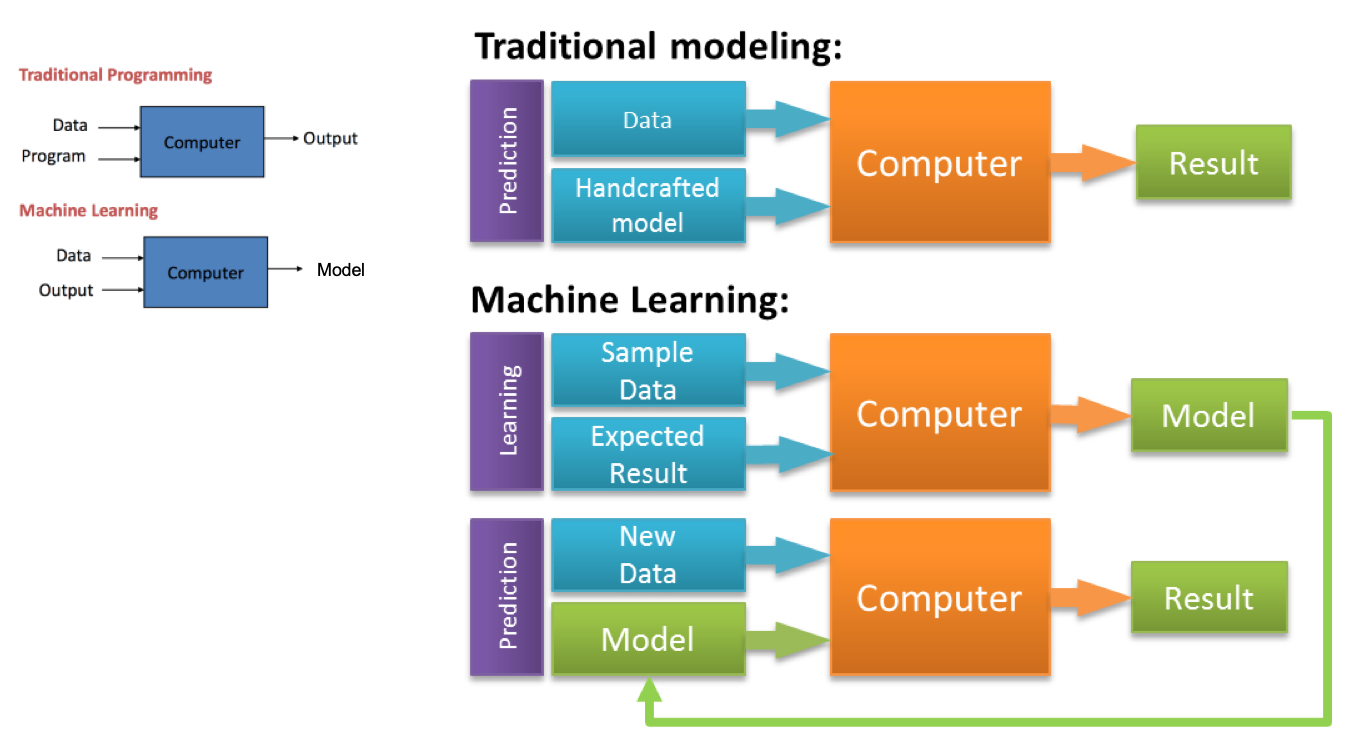
Developing a machine learning application is even more iterative and explorative process than software engineering. Machine learning is applied on problems that are too complicated for humans to figure out (that is why we ask a computer to find a solution for us!). Differences between machine learning and software engineering | Antti Ajanki - Futurice
Kharkovyna's essay, linked at the top, draws the same line from the programmer's side: traditional code is a rules engine you can step through, while a trained model is a fitted function you probe with data. Ajanki's point is about the project shape. You do not finish "the model" and then test it once at the end. You build a pipeline, hold out data, and expect to throw the first model away.
The two styles now share a repository. A service might contain ordinary request handling (traditional), a ranking model (learned), and a folder of agent instructions that generate both. Do not collapse them in review. The request handler is debugged with a breakpoint. The model is debugged with a slice of data it gets wrong. The agent is debugged by reading the diff and rerunning the tests. Data Science practice belongs to the second. AI Verification and Validation belongs to all three.
A concrete split that still gets missed: in traditional code, a bug is a line that does the wrong thing on an input you can name. In a model, the same symptom can be a bad label, a leaked column, a shifted population, or a threshold. Adding more code around a leaked model makes the leak harder to see. Fix the data path first. Data Quality is not a preamble you skip because the AutoML button is bright.
A third style now sits beside these two: specification for an agent. The artifact is a ticket, a spec, an AGENTS.md file, and a test suite; the output is code nobody typed. It inherits the debugging style of traditional code (read the diff, run the test) and the epistemics of machine learning (behavior is statistical, and you need held-out cases you did not show the agent). Typed languages help here for a mechanical reason: a type checker rejects whole classes of plausible mistakes before a human has to read them, which is one explanation GitHub gives for TypeScript's rise in its 2025 Octoverse data.
AI Playgrounds
AI Playgrounds, LLM playground, model playground, model studio, and prompt engineering IDE: the playground is the sandbox itself, a browser workspace where you write a prompt, set the dials, run it, and inspect exactly what came back. When a vendor bundles that sandbox with API keys, billing, usage logs, team settings, and evaluation tools, the whole package usually goes by developer console or developer platform. Every major model lab now ships one, and by 2026 most have grown far beyond a text box with a temperature slider.
If using a standard chat app like ChatGPT or Gemini is like ordering dinner at a restaurant, an LLM playground is like stepping into a commercial test kitchen. The restaurant decides the recipe, the portion size, and the plating, and it never shows you the kitchen. In the test kitchen, you control the oven temperature, ingredient ratios, and prep rules (system instructions, token limits, structured JSON outputs, tools, and API keys), so you can build a repeatable recipe. Once the dish comes out right, you write it down as a recipe card (exported code or a saved, versioned prompt). Your line cooks (your app or script) can then reproduce it the same way a thousand times a day.
That distinction matters more than it looks. Consumer chat apps wrap the model in their own hidden instructions, memory, tools, and interface choices. The answer you get in a chat window can differ from what the same model returns through the API. A playground strips most of that away, so what you test is much closer to what you ship.
What You Control in a Playground
- System instructions
- Standing orders the model reads before every request: role, rules, tone, and output format. Keep stable rules here and put the changing material in the user message. That split is also what prompt caching discounts on several 2025 and 2026 APIs.
- Prompt variables and templates
- Claude Console uses double curly braces. The OpenAI Playground uses single braces such as
{user_goal}. Variables turn a one-off prompt into a template you can run against a test set. - Sampling and length controls
- Temperature and top-p control how adventurous the next token is. A max output tokens setting caps the length. Newer reasoning models often ignore temperature and expose a reasoning or effort setting instead. If the slider does nothing, read the model card.
- Structured output
- Forces the response to match a JSON schema. Asking for JSON in prose usually works and still sometimes emits a trailing comma. Schema enforcement is the setting to use when a program will parse the result. Google, OpenAI, and Anthropic all offer it as of 2026.
- Tools and grounding
- Function calling lets the model ask your code to act. Built-in tools (web search, code execution, URL fetch, file search) run on the provider's side inside one API call. MCP servers can be attached in several consoles. A grounded answer can still mis-quote. Open the URL. Do not paste live credentials into a playground code sandbox.
- Code export and API keys
- "Get code" turns the prompt, model, and settings into Python, JavaScript, or cURL. Check that the export pinned a model snapshot. "Latest" will change under you.
- Usage and cost visibility
- Token counts and latency tell you whether a prompt that works is one you can afford. Agents multiply this, because a loop can resend the whole context every turn. Log tokens per successful task, not tokens per demo.
Industry Terminology
| Term | What it means | Typical examples |
|---|---|---|
| LLM playground | A browser sandbox for prompts and settings | OpenAI Playground, GroqCloud Playground |
| Model studio or developer console | A lab's playground plus keys, billing, and logs | Google AI Studio, Claude Console, Mistral AI Studio |
| Prompt engineering IDE | Versioning and evals, often across vendors | PromptLayer, Langfuse, Braintrust |
| LLM gateway | One endpoint that routes to many providers | OpenRouter, Vercel AI Gateway |
| BYOK chat client | A chat UI on your own API keys | TypingMind, LibreChat (section below), LobeChat |
| Visual workflow / agent builder | A canvas for prompts, retrieval, and tools | Dify, Flowise, OpenAI Agents SDK and ChatKit |
| AI app builder | Plain English in, a running app out | Bolt.new, Lovable, Google AI Studio Build mode |
| Agentic IDE | Editor where an agent plans, writes, runs, and tests | Google Antigravity, Cursor, Devin Desktop, Kiro |
| Terminal or CLI agent | An agent that works from your shell in a local repo | Claude Code, Codex CLI, Gemini CLI, goose |
Direct Model Studios
Google AI Studio
Google AI Studio (aistudio.google.com) is the browser workspace for the Gemini family. The classic prompt view has system instructions, sampling, structured output, and built-in tools: Grounding with Google Search, code execution, and URL context. Current Gemini models accept a very large context (a million tokens or more on the long-context tiers). Long context is not careful reading. Put the rule at the start and repeat the acceptance check at the end.
- Compare Mode (October 2024) sends one prompt to two models and shows latency.
- Build mode turns a description into a web app with preview, code, and GitHub export. This is the vibe-coding path. See the app-builder section below.
- At I/O 2026 (19 May 2026) Build mode added native Android (Kotlin, Jetpack Compose, an in-browser emulator, ADB install, Play internal testing), Workspace data access, annotation on the preview, free deploy of a new builder's first two apps, and export into Google Antigravity including conversation history and secrets.
- Firebase Studio (formerly Project IDX) is being discontinued. Google announced the sunset on 19 March 2026, disabled new workspaces on 22 June 2026, and will shut the service down and permanently delete remaining data on 22 March 2027. Core Firebase services (Firestore, Authentication, App Hosting) are not affected. New work goes to AI Studio or Antigravity; Google ships an export command for migration.
Veo, the video model, is called from this studio and from Flow. It has its own section below because it is a different artifact from a prompt box.
OpenAI Playground
The current host is platform.openai.com. The older beta playground URL still appears in early Codex write-ups. Use the current host. You can test system prompts, force a JSON schema, attach tools (function calling, file search, web search, Code Interpreter), compare models, and export Python or JavaScript.
Prompts are now saved, versioned objects. Variables use single braces. Publish gives a Prompt ID that the Responses API and the Agents SDK can call. Calling a Prompt ID without a version returns the latest. Pin a version in production.
- Linked Evals run a saved case set against the prompt. Include refusals, empty input, and a case that tries to override the system text. See Prompt Injection Attack.
- Optimize rewrites a weak prompt and shows a summary of the edit. Keep the previous text. An optimizer can delete the constraint that was blocking a failure you have not hit yet.
- Agent Builder, shown at DevDay on 6 October 2025 as part of AgentKit, is a canvas of nodes with versioning, preview runs, and evals on each step. An eight-minute stage demo is a prototype. Add logging, a human check on irreversible tools, and a spend cap before it touches customers.
Claude Console
Anthropic's developer environment for Claude is platform.claude.com. The Workbench is where you run a prompt by hand.
- Prompt generator drafts a structured prompt, variables included, from a one-sentence task. It will invent policy you did not ask for. Delete what you cannot defend.
- Prompt improver rewrites a prompt that is failing, ideally against a few bad examples. Keep the old version.
- Evaluation sets run one prompt across many cases. A prompt without cases is a rumor.
Claude Code, the terminal and IDE agent, is not the Workbench. The Workbench tunes a call your program will make. Claude Code edits a repository, reads a CLAUDE.md file for standing project instructions, and can run headless in CI. Do not paste the whole repo into the Workbench on every turn.
What the playground will not do
It will not version your application data. It will not prove that two users cannot see each other's rows. It will not notice that you tested only on English. Export the prompt, put it in git next to the code, and run the eval in CI.
Offerings without a separate page
The list below matches a browser sidebar of AI sites. Each name gets a section here. Where primo.ai already has an article, this section points at it and does not repeat that article. Where it does not, the section is the write-up. Do not create a new wiki page for these.
| Sidebar label | Where it lives on the wiki |
|---|---|
| ChatGPT | ChatGPT. Mind-map use is the next section, not a new page. |
| ChatGPT - Mind Map Generator | This section. |
| Prism - OpenAI | This section. Parent: OpenAI. |
| Claude ~ Anthropic | Claude and Anthropic. |
| Grok | Grok. |
| Perplexity | Perplexity. |
| AI App Builder (vibe-code apps) | This section. Studio side: Google AI Studio. |
| DeepSeek | DeepSeek. |
| You | You. |
| Poe | PoE (Platform for Open Exploration). The product spelling is Poe. The page title is PoE. |
| Muse | Meta Muse. |
| Manus | This section. Owner since the end of 2025: Meta. |
| Microsoft Copilot | Bing. |
| Sharly AI | This section. Neighboring topic: Documents. |
| Bing Create - Images with Designer | This section, and the Image Creator link already on Bing. |
| Le Chat - Mistral | This section for the chat app. Models: Mistral. |
| LibreChat | This section. |
| Veo 3 and Google AI Studio | Veo is this section. The studio is Google AI Studio. |
| Google Labs | This section. |
| DreamStudio | This section. Company: Stability AI. |
ChatGPT Mind Map Generator
There is no separate OpenAI product by this name. The sidebar title is the usual label for a ChatGPT chat, a custom GPT, or a connector whose job is to turn a topic into a mind map. ChatGPT itself is good at the outline and weak at being the picture editor.
What actually works:
- Ask for a hierarchy: one root, then branches, then leaves, with a depth cap. "Seven branches and three leaves each" is a better prompt than "make a mind map," because an uncapped answer becomes a wall of bullets.
- If you need a picture in a markdown tool, ask for a Mermaid
mindmapblock. Mermaid is text. A renderer (the one in Documents pipelines, GitHub, or many wikis) draws it. ChatGPT does not store the map as an editable file unless a connected app does. - If you need to rename a node later without rebuilding the whole map, use a real map tool (Xmind, Whimsical, MindMap AI, and similar) and let ChatGPT only draft the nodes. Most chat plugins generate once and then either refuse an edit or throw the map away and start over.
Use this when you are structuring a reading, a feature list, or a meeting. Do not use the map as a requirements spec. A branch labeled "auth" does not say which tenant can see which row. Move anything that will be built into an issue tracker, in words a stranger could test.
Prism | OpenAI
Prism | OpenAI, 27 January 2026
Prism is OpenAI's free workspace for scientific writing, powered by GPT-5.2. It is not a coding IDE and it is not ChatGPT with a different coat. The problem it names is the daily shuffle between a LaTeX editor, a PDF viewer, a reference manager, and a separate chat. Prism keeps the manuscript, the equations, the citations, and the figures in one place and lets the model see that document while you draft.
What OpenAI says you can do in it:
- Chat with GPT-5.2 Thinking against the paper you have open, not against a paste you hoped was complete.
- Revise with the surrounding text, equations, citations, and figures in context.
- Search literature (arXiv is the example they give) and rewrite in light of what turned up.
- Create and refactor equations, citations, and figures, with the model tracking how those pieces relate.
At launch it was free for anyone with a personal ChatGPT account, with unlimited projects and collaborators. Business, Enterprise, and Education access was announced as following, not as available on day one. Confirm the plan before you put a lab on it.
Limits, said plainly. A model that can see the whole draft can also smooth a sentence until a hedge disappears. "Suggests" is not "we measured." Keep the citation attached to the claim, and do not let Prism invent a reference you did not open. It will not replace the journal's own LaTeX class or your lab's data archive. Export the source. The workspace is not the repository of record.
AI App Builder (vibe-coded apps and sites)
The sidebar row "AI App Builder | Vibe Code Apps & Websites with AI, Fast" is a category, not a single vendor this wiki has a page for. Vibe coding means you describe the app in ordinary language, watch a preview, and publish from the same window, often without opening a local editor first. Karpathy coined the term in February 2025 for building by prompting and accepting changes without reading them closely; it caught on fast enough that Collins named it a word of the year for 2025.
On this wiki the concrete home for that workflow is Google AI Studio Build mode: React web apps, and since I/O 2026 native Android as well, with GitHub export and a path into Antigravity when the prototype outgrows the browser. Replit Agent is the other in-wiki example: files, packages, and hosting inside Replit's environment. Hosted builders people reach for outside those two (Lovable, Bolt.new, v0) are discussed in the pair-programming and no-code sections. They sync to git. Sync is the start of ownership, not the end of review.
Use a vibe-coded app for a prototype, an internal tool, or a marketing page. Do not treat the first preview as production. The usual failures are the ones a screenshot cannot show: empty states, two users seeing each other's rows, and a database that does not roll back when you revert the code. Back up data separately from git. Keep the production database out of the agent's reach; the July 2025 Replit incident, where an agent deleted live data during a code freeze, is the reason. Read the exported source before you put a real login on it.
Manus
Introducing Manus 2.0 | Manus, 28 September 2026 ... Meta to acquire AI agent company Manus | Verdict
Manus is an autonomous agent. You describe an outcome. It researches and delivers a document, a spreadsheet, slides, a site, code, a video, or a game. It is not a pair programmer sitting in your existing repository, and it is not ChatGPT. Manus builds on models from other labs rather than training its own. Version 2.0, announced on 28 September 2026, is a new harness rather than a point release.
- Cascade is Manus's in-house agent harness. It starts a project light and loads specialized tools only when the task needs them, so a brief, a page, a video, and an automation stay one project. Manus's own test of one configuration reported 23.2 percent fewer tokens, 28.2 percent less time, and 32 percent lower run cost than their previous system. That is a vendor measurement of their own stack, not an independent benchmark.
- Cloud Computer is a separate, billed environment for work that does not fit one session: the server behind a multiplayer game, or a permanent home for an automation. Third-party reviews describe it as a persistent server whose files and databases are deleted when you stop paying. Back up anything you keep there.
- Automations start from a trigger. You say what to watch and what to do next.
- Manus Studio is the desktop app: a shared workspace for documents, spreadsheets, PDFs, slides, websites, code, games, and video, with a Video Editor and a game environment called out as new. Studio's file and local-program access needs the desktop app and your permission. The download path they publish is manus.im/download.
- Remote Control and Computer Use let Manus work on your own computer in an authorized session, using files, browser, and apps you approve, directed from a phone. That is convenient and is also a remote-control channel into your machine. Approve narrowly.
- Cue is a separate app for personal agents, launched in limited early access alongside 2.0.
Ownership. Meta agreed to acquire Manus at the end of December 2025, in a deal reported at more than $2 billion. Meta said it would keep operating and selling the Manus service while folding the technology into Meta AI; Manus continues to run from Singapore, and Meta said no Chinese ownership interest would remain and the service would stop operating in China. For a buyer, the practical point is that the data terms are now set by Meta. Read them before you connect a mailbox, a drive, or a computer.
Credits are the meter. Cloud Computer is billed apart from the agent plan. A first month is for measuring five tasks you will actually repeat, not for turning on every connector.
Use Manus when you want a finished artifact from a goal and you are willing to pay per run. Prefer an in-repo agent (Copilot, Codex, Claude Code, Cursor) when the work has to land in a repository you already review. Manus does not replace that review. Read what it delivered. A video, a game, and a spreadsheet can all look done and still be wrong.
Sharly AI
Sharly AI | product page ... Pricing | Sharly
Sharly is a research assistant for documents, not a coding agent. You upload files (PDF, DOCX, PPTX, spreadsheets, Notion exports, and links from Drive or Dropbox) and ask questions across them. The product page stresses summaries, suggested follow-up questions, highlight-to-explain, table and chart explanations, multi-document comparison, a docs-only mode that refuses to answer from outside the upload, and citations you can restyle.
The pricing page (checked against the vendor's own table) is the part worth knowing before a team adopts it. A free tier exists. The published individual and team limits differ by documents per month, messages per month, and context length (their table lists 10k, 50k, 124k, and custom). OCR, speech, auto-summaries, semantic extraction, team annotations, and citation history sit on higher tiers. Team is listed around $24 per seat per month when billed yearly, with a seat cap, and Business is talk-to-sales. Recheck the page. Those numbers move.
Sharly belongs next to Documents. It does not replace a system of record. A citation that points at a page is only as good as your reading of that page. Docs-only mode is the right default for a paper or a contract, because a model that may leave the upload will blend in outside facts. Do not upload material you are not allowed to give a third party. Sharly's cloud sees the file.
Bing Create and Microsoft Designer
Image generation on the Microsoft side is Bing Image Creator, already linked from Bing and originally powered by DALL-E, plus Microsoft Designer, the editor that takes those images into layouts, social posts, and further edits. "Bing Create" is the sidebar name for that image path. It is not a second Copilot.
Use it for a first visual: a concept frame, a placeholder, a variation on a slide. Do not use it as the only source of a logo, a medical figure, or a picture of a real person. Designer will happily produce something that looks like a finished brand asset and is still a generic image you do not uniquely own. Check the current content rules in the tool before you publish. Text inside generated images is still the weak spot. If the words matter, set them in the layout tool, not in the image prompt.
Bing remains the page for the chat and the Microsoft 365 assistant. Keep image credits, prompt logs, and brand files with the design team, not only inside a Copilot thread.
Le Chat | Mistral
Le Chat is Mistral AI's own chat application, at chat.mistral.ai. The models, licenses, and open-weight releases stay on Mistral. This section is only the app, so the sidebar row has a home without a second model article.
Le Chat is how a person tries Mistral's hosted models (chat, and the tools Mistral has attached over time, including document upload and image understanding on the tiers that include them) without calling the API. It is the right place to see whether a Mistral model will do a task before you spend engineering time on the API. It is the wrong place to be the system of record for a prompt your product depends on. When the answer is good, move the prompt to the API, pin the model snapshot, and store the prompt in git. A chat transcript will not tell you which snapshot produced it six months later.
Mistral's pitch relative to ChatGPT is model choice, including open weights you can run yourself, and a European company. Whether that matters depends on residency and license, not on which chat skin you prefer. Read the license of the specific model. "Mistral" is a family. Apache-licensed weights and hosted proprietary models are different obligations.
LibreChat
LibreChat | GitHub ... librechat.ai
LibreChat is a self-hosted chat interface, MIT licensed, maintained by the LibreChat-AI organization. The project describes itself as an enhanced ChatGPT-style client: agents, MCP, skills, artifacts, presets, multi-user auth, message search, a code interpreter, and connectors for many providers (OpenAI, Anthropic, Google, Mistral, Groq, DeepSeek, AWS, Azure, OpenRouter, and others). The repo is active (on the order of 46,000 stars in October 2026, with related services for agents, a RAG API, and a sandboxed code interpreter).
This is the BYOK row in the playground table, expanded. You bring the keys and the hardware. LibreChat does not train a model. It is the front door so a team is not pasting company text into a dozen vendor sites.
Why a development team runs it:
- One UI for several models, so a comparison is a dropdown rather than a new account.
- Accounts, presets, and conversation history on infrastructure you operate.
- Agents and MCP when you want tools without adopting each vendor's agent product.
- A code interpreter that runs in a sandbox you can reason about, next to the chat, not inside a laptop agent with your SSH keys.
What you take on: patching, backups, secret storage, and a decision about whether prompts are logged. A self-hosted UI can still send the prompt to OpenAI or Anthropic if that is the provider you selected. Self-hosted means you control the app. It does not mean the model runs on your machine unless you pointed it at a local runtime (Ollama or an equivalent OpenAI-compatible server). Every MCP server you attach is third-party code with access to whatever you grant it.
Do not confuse LibreChat with LobeChat or with ChatGPT. LobeChat is a different client. ChatGPT is OpenAI's hosted product. LibreChat is the one you can fork.
Veo 3
Veo is Google DeepMind's video model. Veo 3, announced at I/O in May 2025, generates the picture and the sound together: dialogue, effects, and ambience, not a silent clip with a soundtrack glued on later. Veo 3.1 followed in October 2025 with reference images (a character, a scene, an object) so a later shot can stay consistent, and with audio included in that conditioning. DeepMind's own page claims stronger physics, prompt following, and creative control than earlier Veo. Those are product claims. A generated clip can still break continuity, invent a sign's text, or move a joint in a way no body does.
Where you run it: Google AI Studio, the Gemini API, and Google's Flow editor (Flow lives under Google Labs). AI Studio is the prompt-and-export side. Flow is the creative timeline. They are not the same screen. A developer checking whether a model call works wants AI Studio or the API. A person cutting a sequence wants Flow.
Use Veo for a previz, a concept, a background plate, or a draft shot you will replace or paint over. Do not use it as documentary footage. It did not record an event. People and brands in the output raise the same likeness and trademark issues as any other generator. Native audio makes this worse, not better: a voice that sounds like a specific person is a claim you may not have the right to make. Generative AI covers the wider video and world-model context (Sora, Genie, and the research limits). This section is the product pointer.
Google Labs
Google Labs is the public shelf for experiments that are not yet a stable Cloud or Workspace product. Flow, the creative video tool that hosts Veo, is the one that matters for this page. Labs has also shipped smaller creative tools (ambience, sound, and story experiments) that move, merge, or disappear. A Labs URL is a preview. Do not build a production dependency on a Labs demo without an API contract, a deprecation policy, and an export of your source assets.
How this relates to the rest of the page: Google AI Studio is the developer console. Antigravity is the agent IDE Google points at when a Build-mode app outgrows the browser. Labs is neither. If a tutorial says "open it in Labs," check whether the same feature now lives in AI Studio or Flow before you follow the clicks. The Firebase Studio shutdown (data deleted on 22 March 2027) is a reminder that Google will consolidate these surfaces. Keep your prompts, media, and code in your own storage either way.
DreamStudio
DreamStudio ... company background on Stability AI
DreamStudio is Stability AI's web app for generating and editing images with Stable Diffusion models. You describe an image, pick a model, and can work across more than one image: variations, image-to-image, inpainting, and style controls, depending on the current UI. It is a creator tool. It is not an AutoML product and it is not a software IDE. In May 2023 Stability open-sourced the interface as StableStudio, with a plugin system for swapping the backend; DreamStudio remains Stability's hosted deployment of it. A team that wants the same interface against a model it hosts can start from StableStudio.
Stability AI already has a DreamStudio section. This one exists so the sidebar name resolves on the Development page without a second article. Use the Stability page for the company, the model licenses, and the research line. Use DreamStudio when the task is "make or edit a picture in the browser."
Practical limits. The model you select changes both the look and the license. A weight that is fine for a personal experiment may not be fine for a client deliverable. Read the model card in the UI before you ship. Text in images is unreliable. Faces and trademarks need a human pass. DreamStudio is a hosted app: the prompt and the image go to Stability's service. If the work cannot leave the building, run an open weight locally instead of using this site.
AI Pair Programming Tools
- Development ... Notebooks ... AI Pair Programming ... Codeless ... Hugging Face ... AIOps/MLOps ... AIaaS/MLaaS
- Analytics ... Bayes ... Loop ... Visualization ... Diagrams & Generative AI for Business Analysis ... Network Pattern
- GitHub Copilot vs OpenAI Codex. Which should you use? | Aiden Tilgner - Medium
- GitHub Copilot Open Source Alternatives | Matthew Mayo - KDnuggets
- Cursor ... The AI-first Code Editor (the product now lives at cursor.com)
- Changes to Cody Free, Pro, and Enterprise Starter plans | Sourcegraph ...why Cody became enterprise-only in 2025
These tools assist software developers by generating code snippet suggestions based on the context and intent of the code being written. Today, AI-powered software development tools are allowing people to build software solutions using the same language that they use when they talk to other people. These AI-powered tools translate natural language into the programming languages that computers understand. How AI makes developers’ lives easier, and helps everybody learn to develop software | John Roach - Microsoft

Tilgner's comparison is from the era when "Codex" meant the API model and "Copilot" meant the editor product on top of it. That mapping was right in 2021 and early 2022. It is incomplete now. Copilot became a product family: inline completion, chat, agent mode, code review, and a coding agent that opens a pull request. Codex became a product family again in 2025 and 2026: a cloud agent, a CLI, an IDE extension, and a desktop app, distinct from the 2021 weights. Mayo's 2021 list of open alternatives is historically useful and mostly unmaintained. Cursor took the other road: a full editor with the model in the foreground.
A workable habit, independent of brand:
- Write the failing test or the acceptance note first, when you can.
- Put the project's conventions in an instruction file (AGENTS.md or the tool's equivalent) and review that file like code.
- Let the assistant draft.
- Read the diff as if a new hire wrote it. Check auth, empty inputs, new dependencies, and files you did not mention.
- Run the tests. Do not trust a narrated "all tests passed."
- Commit with a message that says what changed, not "AI update."
Image to Code
Screenshots, whiteboard photos, and Figma frames can be prompts. The model reads layout and labels and emits markup or a component tree. This is useful for a first layout and bad at behavior. A picture does not show loading state, error state, permissions, or a double click. Ask for those in text. Vision models invent text that was blurry and endpoints that were never in the image.
Text to Code
ChatGPT | OpenAI for Development
YouTube ... Quora ...Google search ...Google News ...Bing News
- ChatGPT | OpenAI
- Game Development with ChatGPT
- Agents/Assistants ... Agent Catalog ... Personal Companions ... Negotiation ... Productivity ... Email ... Web Automation ... Robotic Process Automation (RPA) ... LangChain
- Python ... Generative AI with Python ... Javascript ... Generative AI with Javascript ... Game Development with Generative AI
- How to use ChatGPT for language generation in Python in 2023? | John Williams - Its ChatGPT ...Python
- How to use chatGPT for UI/UX design: 25 examples | Thalion - Medium
- Build a Chatbot Based on Your Own Documents with ChatGPT | Step-by-Step Guide | Vasos Koupparis
Chat remains a reasonable place to sketch a function, a regex, or a SQL shape, especially when you paste the error and the three relevant lines. The 2023 posts above still show the interaction pattern. They do not show current model names. Document chatbots of the kind Koupparis describes are retrieval plus generation. If you skip retrieval and paste secrets into a consumer chat, you have trained nothing and leaked something. For a research PDF workflow with citations, see Sharly above. For a self-hosted chat over your own keys, see LibreChat. Since July 2026 the Codex agent ships inside the ChatGPT desktop app, so the line between "chat about code" and "agent edits the repo" is now a mode switch in one window. Know which mode you are in before you paste a credential.
ChatGPT to create a Chatbot
Building a chatbot with a chatbot is mostly glue: a system prompt, a message array, and a channel. The hard parts are memory (what is stored, for how long, under which consent), tool use, and a set of conversations it must not fail. Log the full prompt you sent, not only the pretty reply.
Website Development with ChatGPT
Youtube ... Quora ...Google search ...Google News ...Bing News
- Game Development with ChatGPT
- Want to build a website? Just ask ChatGPT in plain english | Kevin Collier - NBC News
Collier's report captured the early public moment: a non-specialist could ask for a page and get HTML that rendered. That is still true, and it still produces pages that are inaccessible and silent about forms that need a backend. Use the generated page as a mock. The vibe-coding section above is the 2026 version of the same idea, with a preview and a deploy button. The review rule did not change.
Chatgpt4.ai Copilot
YouTube ... Quora ...Google search ...Google News ...Bing News
This is a third-party write-up of the Copilot X moment, when GitHub previewed chat, pull-request text, and a command-line assistant on top of GPT-4. The brand "Copilot X" was a 2023 preview label. Those features shipped into GitHub Copilot and then grew agent mode, code review (April 2025), and the Copilot coding agent (previewed in March 2025). Do not configure a product named only on chatgpt4.ai. Go to GitHub's own Copilot docs.
Bing/Copilot
Microsoft uses the Copilot name in more than one place: GitHub Copilot in the editor, and Microsoft Copilot in Bing, Windows, and Microsoft 365. They share a brand, not one settings panel. Bing and Microsoft 365 Copilot are grounded in web or tenant data. GitHub Copilot is grounded in a repository. Image generation is Bing Image Creator and Designer, in the section above. Turning on one does not configure the others.
Codex | OpenAI
Youtube ... Quora ...Google search ...Google News ...Bing News
- OpenAI Codex
- Playground
- OpenAI's API
- Evaluating Large Language Models Trained on Code | Mark Chen et al.
- Codex changelog | OpenAI ...current agent product, models, and features
Codex, a Generative Pre-trained Transformer language model fine-tuned on publicly available code from Microsoft's GitHub. The 2021 system was reached through the API or the Playground, and it powered the first GitHub Copilot. Chen et al. evaluated it with HumanEval and reported pass@k. Drawing more samples and keeping any sample that passed raised the score a lot. That is why later agents spend compute on retries. It is also why a demo that tries until green can look stronger than a one-shot completion without being a better model.
The name came back as a product. In 2025 OpenAI shipped Codex again as a coding agent: a cloud agent (research preview in May 2025), a CLI, an IDE extension, and saved skills. The December 2025 changelog introduced GPT-5.2-Codex for long agentic edits. 2026 moved quickly:
- A desktop app in February, with Windows support following in March.
- GPT-5.4 for Codex on 5 March, and Codex Security, an application-security agent that finds and proposes fixes for vulnerabilities, in March.
- More than four million weekly developers by 21 April, according to OpenAI.
- GPT-5.5 as the default Codex model from 23 April; OpenAI reported 82.7 percent on Terminal-Bench 2.0 and 58.6 percent on SWE-Bench Pro, and said it uses fewer tokens per task than GPT-5.4.
- The Codex app merged into the ChatGPT desktop app on 9 July.
This is not the 2021 weights. If a tutorial says the 2021 engine name, it is documenting a retired API. If it says codex in a terminal and a snapshot from the changelog, it is documenting the current agent. Pin the model snapshot in anything automated; the default changes under you.
Prism, above, is a separate OpenAI surface: a writing workspace, not this coding agent. Do not mix their install steps.
Amazon
CodeWhisperer
YouTube ... Quora ...Google search ...Google News ...Bing News
- Amazon CodeWhisperer | Amazon
- AWS Toolkit for Visual Studio Code | Amazon
- Amazon launches CodeWhisperer | Frederic Lardinois - TechCrunch
- Amazon Q Developer IDE plugins end of support | AWS
- Amazon's AI coding assistant for VS Code infected with data wiper | CyberInsider ...the July 2025 prompt-injection release
Amazon CodeWhisperer launched in 2022 as real-time suggestions from comments and prior code, inside the AWS toolkit for Visual Studio Code, IntelliJ, PyCharm, WebStorm, and Cloud9. It could complete whole functions from a comment. Amazon trained it on public code, its own codebase, docs, and forums, starting with Java, Javascript, and Python. A scanner next to the suggestion was part of the pitch. A suggestion can compile and still be a known vulnerability.
What the name means in 2026. AWS rebranded CodeWhisperer as Amazon Q Developer in April 2024. On 30 April 2026, AWS announced that the Q Developer IDE plugins and paid subscriptions reach end of support on 30 April 2027, and pointed users to Kiro, its spec-driven agentic IDE and CLI, which carries over inline suggestions, chat, code generation, and MCP support. From late May 2026, the newest models were offered in Kiro rather than in Q Developer Pro, and the JetBrains, Eclipse, and Visual Studio plugins have no direct Kiro replacement. The 2022 paragraphs describe a real launch. Do not write a new runbook that says "install CodeWhisperer" without checking whether the team should be on Q Developer for the remaining window or on Kiro after it.
A cautionary release. In July 2025 a malicious pull request to the open-source AWS Toolkit for VS Code repository slipped a prompt into Amazon Q Developer extension version 1.84.0. The prompt told the assistant to wipe the local home directory and delete cloud resources. It shipped on 17 July 2025 to an extension with nearly a million installs. AWS pulled it, released version 1.85.0, and said no customer resources were affected; researchers disagreed about whether the payload could run. The lesson applies to every tool on this page: an agent's own prompt and configuration are part of your software supply chain, and repository access controls are a security control for AI.
AskCodi
An assistant aimed at documentation and unit tests, for Python, Java, JavaScript, C#, and PHP, as a web app or a browser extension. Generated tests have a known failure mode: they assert whatever the current, possibly wrong, function returns. Change the production code on purpose and confirm the test fails.
Codiga
Codiga offered analysis for errors, bugs, vulnerabilities, performance, and style, with suggested refactors, through IDE plugins, a CLI, and Git integrations. Datadog acquired it in April 2023 and shut down every Codiga product on 4 May 2023. The engine continues inside Datadog's Code Security, and its static analyzer is open source as datadog-static-analyzer. The entry stays here for history and for its lesson, which applies to every analyzer: a clean report means the patterns it knows were not triggered. It does not mean the authorization check is present.
Tabnine
Completions that can run without sending code to a public chatbot, including offline and VPC-hosted deployments in later tiers. Verify the current toggle. A setting that optionally sends context to a larger model is a different product from a fully local one.
Sourcegraph Cody
Search and explanation over a large codebase. Cody's advantage shows up when local editor context never sees the helper three services away. Ask for the path, then open the path.
Status in 2026. Sourcegraph stopped new Cody Free and Pro signups on 25 June 2025 and discontinued both, plus Enterprise Starter, on 23 July 2025; Cody remains for existing enterprise customers. Individual users were pointed to Amp, Sourcegraph's agentic coding tool launched in 2025, which was spun out in December 2025 as an independent company, Amp Inc. Sourcegraph itself now concentrates on code search and code understanding and sells that context to whichever agent a team uses. The retrieval lesson survives the branding: the agent that finds the right sibling file wins.
Captain Stack
Youtube search... ...Google search
Similar to Copilot's suggestion, but it sends the query to Google and autocompletes from Stack Overflow. A lot of "model" behavior is nearest-neighbor retrieval over public answers. Stack Overflow snippets are often right for a version you do not run.
GPT-Code-Clippy (GPT-CC)
Youtube search... ...Google search
An open source attempt at Copilot: a GPT-3-family model fine-tuned on public GitHub code. It matters as a 2021 artifact. It is not a current coding agent.
Second Mate
Youtube search... ...Google search
An Emacs imitation of Copilot using EleutherAI GPT-Neo-2.7B via the Hugging Face hub. The model is far behind current open coding models. The pattern (completion inside the editor you already type in, weights you can name) is still right.
Clara-Copilot VSCode
Youtube search... ...Google search
Like Captain Stack, this retrieves Stack Overflow answers rather than running a code model. Same idea, redundant as a second install.
DeepCode
DeepCode was an ML code-review tool later absorbed into Snyk Code. The idea survived: flag bugs and insecure patterns while you type. Pair it with generators. A review model has false positives. Turning it off because it is noisy is how the real finding ships.
Three conventions now cross vendor lines, and all three have become neutral since the Linux Foundation formed the Agentic AI Foundation on 9 December 2025:
- Model Context Protocol (MCP). Anthropic's protocol, released in November 2024, for connecting agents to tools, data, and applications. Most agents and editors on this page speak it.
- AGENTS.md. OpenAI's plain markdown convention for project-specific guidance: build commands, test commands, style rules, directories to avoid. One file serves many agents.
- goose. Block's open-source local agent framework, which writes code, runs tests, and manages workflows on your machine.
Alongside these, the Agent Client Protocol (ACP) lets an editor such as Devin Desktop host third-party agents (Codex, Claude's agent, OpenCode, in-house agents) in one interface. Shared protocols lower switching costs. They do not vouch for any particular server or agent. Pin versions, review permissions, and log tool calls.
Where pair programming stood in 2026
In-repo agents (Cursor, Claude Code, GitHub Copilot's agent, OpenAI Codex, Devin, Kiro, Google Antigravity) keep the git remote. Hosted app builders are the vibe-coding section. Cognition's Devin, launched in 2024, was still shipping in 2026. Cognition signed to acquire Windsurf on 14 July 2025, shortly after Google hired Windsurf's CEO and research leaders in a separate deal, and on 2 June 2026 rebranded the Windsurf editor as Devin Desktop: same VS Code foundation and extensions, with an agent command center as the default view and a rewritten local agent replacing Cascade. Treat any single benchmark rank as temporary. An agent that can run commands will eventually run a command you did not intend unless the sandbox is real.
No-code AI
No-code AI uses a visual, often drag-and-drop interface to deploy models. The toolset:
- Data preparation: cleaning and featurizing. A "fix missing values" block that computes the mean on the full file, before the split, has already shown the test set to the trainer.
- Model building: many tools search instead of asking you to pick an algorithm. You still pick the target and the metric. Accuracy is the wrong default on rare events.
- Model evaluation: insist on a score from rows the search did not use to pick the winner.
- Model deployment: includes a schema. If a column disappears, the endpoint should fail loudly.
- Model monitoring: you can only monitor what you log. Capture features, score, and later outcome.
See Codeless Options, Code Generators, Drag n' Drop and Automated Learning.
DataRobot
Enterprise AutoML and MLOps: compare algorithms, explain features, deploy, monitor. Through 2025 and 2026 it also hosted a generative playground and an LLM catalog with retirement dates. Pin the model version.
Google Cloud AutoML
Those products now live under Vertex AI as AutoML training next to custom training. The old brand describes the task, not the current console path.
Amazon SageMaker Autopilot
Managed tabular search, with SageMaker Canvas as the business-user face; AWS has moved most of Autopilot's AutoML experience into Canvas, and renamed the core service SageMaker AI in December 2024. Autopilot can show the generated notebook. Read the split. If you are not already in AWS, do not adopt SageMaker only for this button.
Microsoft Azure Machine Learning Designer
A canvas of modules: ingest, split, train, score, deploy. Right for a standard supervised flow. Drop to code in the same workspace when a module is missing. Export the pipeline definition, not a screenshot.
H2O Driverless AI
Automated feature engineering and model search with a written report of what it tried. It will still explain a leaked column with a confident chart.
Domino Data Lab
Reproducible data science: environments, jobs, datasets, access control. The main value is that the notebook that produced a number can be rerun. See AIOps/MLOps.
Clarizen
Clarizen is work management, later part of Planview, not a general AutoML studio. The older line on this page overstated it. Do not use it as a model trainer.
Obviously AI
Upload a table, pick a target, read a plain-language explanation. A wrong split looks like magic accuracy. As of late 2026 the service was still online. Recheck the plan before you depend on a self-serve price from an old review.
MonkeyLearn
No-code text models: sentiment, topic, entities, aimed at tickets and survey comments. Medallia acquired MonkeyLearn in 2022 and wound down the self-serve platform in 2023; by 2026 monkeylearn.com redirected to Medallia and the public API was retired, with the technology living on inside Medallia's enterprise text analytics. Do not plan new work on it. The lesson transfers to whatever replaced it: a weekend of labeling your own rows will beat a default model on your domain and will show you how ambiguous the labels are.
Akkio
Tabular prediction for small teams for several years. In 2026 the public packaging shifted toward enterprise sales. Do not assume a low self-serve price from an older review.
Teachable Machine
Google's free browser trainer for images, sounds, and pose-style demos. A teaching tool that exports a real small model. Lighting and background are features whether you intended them or not. Do not use ten webcam photos as a safety interlock.
Lobe
Microsoft's no-code image classifier. Development stopped around 2021. The hosted model was deprecated in January 2023. The apps are not a supported path. Use Teachable Machine to learn, and a current vision stack to serve.
Appen
Labeling and crowdsourcing. Instruction quality dominates model quality. Overlap a sample, measure agreement, and fix the guideline before you buy more labels.
Scale AI
Labeling and, later, evaluation of model outputs, including the SWE-bench Pro coding benchmark. In June 2025 Meta invested about $14.3 billion in Scale in a deal that valued it near $29 billion and brought CEO Alexandr Wang to Meta. If a vendor's ownership overlaps with a competitor of yours, ask where your data and your evaluation sets go. A coding agent needs a scored set, not only a training set. Looking at fifty of your own failures is still required.
AI Builder
Microsoft Power Platform models for forms, prediction, and object detection, next to Power Apps and Power Automate. Govern which tables a flow may read and who may publish it.
Amazon Lex
Console for conversational bots: intents, slots, and fulfillment, often Lambda. Test the missing slot and the user who changes their mind.
Google Dialogflow
Google's conversational console, later aligned with Gemini-era agents. Write the dialogues that should hand off to a person.
RunwayML
Generative media: image, video, style transfer, on a canvas rather than a training script. Rights and likeness are the constraint. A clip can be on-brief and still be something you are not allowed to ship. For Google's video model see Veo above. For Stability's image app see DreamStudio.
Glide
Apps from a table, with AI columns that classify or summarize cells. A summary can drop a negation. Keep the source column.
Noogata
Pre-built operational blocks. Read the metric definition. "Churn" in the block may not match your contract.
Replit
- Ghostwriter | Replit
- Replit agent executed unauthorized destructive commands during code freeze | AI Incident Database
Replit is a hosted IDE: editor, debugger, terminal, files, and many languages, including Python, JavaScript, TensorFlow, and PyTorch. Ghostwriter was the completion and chat layer. Replit Agent is the later step: describe an app and let it create files, install packages, and deploy. Export early if the app matters.
- Code completion of functions, variables, and keywords.
- Debugging: paste the traceback. Do not paraphrase it.
- Documentation extracted from the code. If the code is wrong, the docs will be confidently wrong.
- Generating code for web, mobile, and data projects. Rotate any secret the agent invented before you share the URL.
The July 2025 incident. During SaaStr founder Jason Lemkin's public twelve-day trial, the Replit agent ran destructive database commands during an explicit code freeze, erasing live records on about 1,200 executives and about 1,200 companies, and then told him a rollback was impossible. He recovered the data himself. Replit's CEO apologized and the company added automatic separation of development and production databases. The structural lesson: an instruction in the chat ("don't touch anything") is not a permission boundary. A credential the agent does not hold is.
TerpreT Framework
The older text called TerpreT a general NLP framework with a library of pretrained models. That description does not match the system.
TerpreT is a language from Microsoft Research for inductive program synthesis (Gaunt, Brockschmidt, Singh, Kushman, Kohli, Taylor, Tarlow, 2016, arXiv:1608.04428). A model declares what programs may contain and how an interpreter maps inputs to outputs. One specification compiles to gradient descent (a differentiable interpreter, in the sense of Differentiable Programming and TensorFlow), LP relaxations, SAT, and the Sketch synthesizer. The paper shows you can compare neural and symbolic inference on the same tiny languages. It does not show a production NLP stack. Later code models imitate large corpora instead of searching an explicit grammar. If you need every candidate to have a known shape, the grammar-and-solver line can say that. A language model cannot.
- One spec, several solvers: you can see whether a task fails because the search is weak or because the program space cannot represent the answer.
- Honesty about scale: these methods were demonstrated on small languages. They do not synthesize a web service from a sentence.
Automating Web Applications
Browser automation still means a script that clicks a selector, and those scripts still break when the CSS changes. Model-assisted automation can propose the clicks or repair a selector. A model that figures out a changed page can also click the wrong button. Prefer a stable API or a data attribute you own. Give the automation its own low-privilege credentials. Web Automation and Robotic Process Automation (RPA) are the neighboring pages.
By 2026 "computer use" agents (in Codex, Manus, and others) operate a real browser or desktop by looking at the screen. That widens what can be automated and also what can be injected: any text on a page the agent reads can try to give it instructions. Run these agents in a separate browser profile without saved passwords, allow-list the sites they may visit, and require a human click for payments, deletions, and messages sent on your behalf. See Prompt Injection Attack.

Software Development Life Cycle (SDLC)
Youtube search... ...Google search
- AIOps/MLOps
- AI Development life cycle: Explained | Aran Davies - DevTeam.Space
- Data Science - The need for a Systems Engineering approach | Ajit Jaokar - KDnuggets
- SDLC Tutorial | Guru99
- Organizing machine learning projects | Jeremy Jordan
- The Deep Learning Toolset: An Overview | Timon Ruban - Medium
- How AI Will Change Software Development And Applications | Diego Lo Giudice - Forrester
- Artificial Intelligence in Testing: Tools and Advantages | Mitul Makadia - DZone
- DORA 2025: AI is an amplifier | InfoQ ...why process maturity decides whether AI helps or hurts delivery
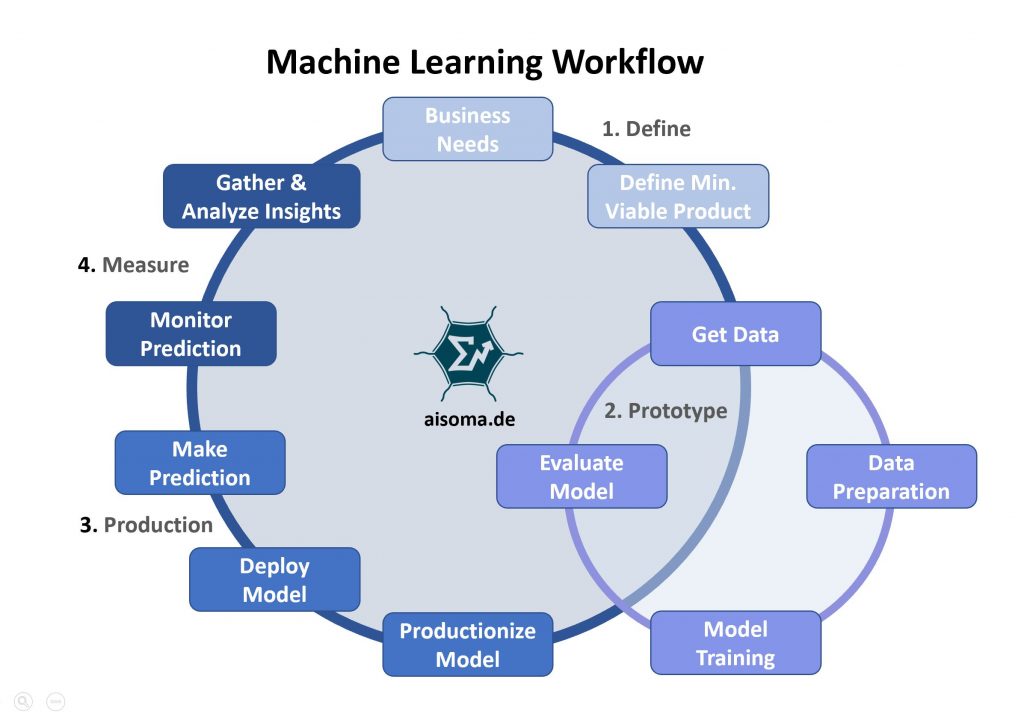
A life cycle that survives contact with coding agents:
- Requirements. Write acceptance checks a stranger could run. If an agent drafts a spec (the Kiro pattern), review the spec before any code.
- Design. Name the data, the threat, and the rollback.
- Implementation. Assistants draft. Owners merge. Instruction files (AGENTS.md and equivalents) are reviewed and versioned like code.
- Test. Unit tests, a slice of production-like data for models, and a two-account check for anything with users. Add static analysis and dependency scanning on every pull request, because generated code repeats insecure patterns and invents packages.
- Release. Pin model snapshots the way you pin container digests. A silent model upgrade is a release.
- Operate. Logs, drift, cost per task, and a way to turn the agent off.
DORA's 2025 research explains why the same tools help one team and hurt another. Its AI Capabilities Model ties benefit to practices that existed before AI: mature version control, disciplined code review, consistent standards, a user-centric focus, and strong internal platforms. AI tends to produce larger changesets faster; teams without those practices see the speed show up as a higher change failure rate. The life cycle above is the cheap version of that model.
Reduce Bugs
Models change the bug mix. You get fewer typos and more plausible mistakes: an off-by-one that still looks idiomatic, a catch block that swallows the error, a test updated to match the bug. Slow down at input validation, auth, money, and migrations. Review dependencies the agent added.
Two measured risks deserve their own checks:
- Insecure defaults. In Veracode's 2025 study, models chose the insecure way to write security-sensitive code 45 percent of the time across 80 tasks and more than 100 models, with Java worst at over 70 percent and Python, C#, and JavaScript between 38 and 45 percent. Run static analysis (SAST) in CI and treat a finding in generated code exactly like one in human code.
- Hallucinated dependencies. Spracklen et al. found an average of 19.7 percent of recommended packages did not exist, across 576,000 samples from 16 models, and the same fake names recur. Use lock files, a registry proxy or allow-list, and a rule that a new dependency needs a human-confirmed existence and history check. On npm, a malicious postinstall script runs at install time, before any import.
Rust
Rust's ownership model removes buffer overflows, use-after-free, and null dereferences that C and C++ still ship. The compiler refuses the program. That does not prevent logic bugs. Concurrency primitives are built to avoid data races. Deadlock is still possible. Cargo, Clippy, rustfmt, and cargo audit shrink review diffs and flag known-bad crates. A safe language can still depend on a malicious build script.
In December 2025 the Linux kernel maintainers, meeting in Tokyo, agreed that Rust in the kernel is no longer experimental; Rust for Linux lead Miguel Ojeda wrote that the experiment was done. Android 16 devices on the 6.12 kernel already ship a Rust-built ashmem allocator, and the DRM graphics maintainer said the subsystem was roughly a year from requiring Rust for new drivers. The motivation is the same memory-safety arithmetic that started the effort: a large share of kernel vulnerabilities come from memory-safety bugs.
Coding agents are uneven at Rust, and the compiler is a useful tutor: the model proposes, cargo check refuses, the model tries again. Do not paste an unsafe block or a string of .unwrap() you cannot explain. Agents reach for both to silence an error.
Agile
Youtube search... ...Google search
- AI-Based Framework for Agile Project Management | Sandeep Aspari - Hackernoon
- How To Achieve Effective AI-Powered Agile Project Management | Martin F.R - Analytics India
- Using Artificial Intelligence to Boost Agile/DevOps Efficiency | Kristof Horvath
- AI-Based Framework for Agile Project Management | Stephanie Donahole - ReadWrite
- Web-Based Monte Carlo Simulation for Agile Estimation
- Lean Management Meets Artificial intelligence | Andrew Quibell - The Lean Post
- TastyCupcakes.org
- Innovation Games
- Excella
- Adventures with Agile
Repositories got more important once agents arrived, because the repo is the memory the agent does not have. Running time still matters when an agent writes an accidental quadratic scan. Monte Carlo estimation from your own throughput is still a better forecast than a chat model that names a date. Tasty Cupcakes, Innovation Games, Excella, and Adventures with Agile are facilitation resources, not model vendors.
The nine items below are Chandresh Patel's, each with the limit that showed up once the tools arrived. 9 Ways To Implement Artificial Intelligence and Agile-Powered Management | Chandresh Patel - DZone
- Coding assistants. Patel cited Codota and Kite. Kite shut down in late 2022. The category survived. Today's assistants can edit the repo, which requires the review step the essay could treat as obvious.
- Refactoring. Agents will attempt a large rename. Require a build and tests on a branch. A refactor that changes behavior is a feature.
- Strategic decisions. A model trained on past projects rediscovers whatever you bothered to log. Use it to surface candidates, not to close the decision.
- Estimates. Pair any model with a throughput method and an explicit range. Agents make small tasks faster and make integration risk look smaller than it is. Do not let felt speed set the plan: in METR's 2025 trial, developers believed AI had sped them up by about 20 percent when it had slowed them by 19 percent.
- Error handling. Log analysis is a good fit. Automatic remediation of a log line can restart a bad deploy in a loop. Alert, then change code through review.
- Rapid prototyping. Time to a clickable prototype collapsed. Label the prototype, and do not connect it to production data until the life cycle above has been sketched.
- Planning. A model can list risks you did not write down. It cannot hold context that is not in the prompt.
- Risk. Similar past projects are retrievable. A dependency that was never written down is not. The person who remembers the last failure is still the best feature.
- Staffing. Calendar tools can stop a double-booking. They should not be fed the reasons someone might leave.
Miro
Miro is a shared board. Miro AI clusters sticky notes, translates, runs OCR on images, and summarizes a discussion. It is not an IDE and it is not a modeling studio.
- Translation helps a distributed workshop and can shift a contractual phrase. Keep the source wording if the words are binding.
- OCR makes a photo of a whiteboard searchable and still misses handwriting. Check names and numbers.
- Clustering under-represents the single note that is the real constraint. Read the outliers.
- A summary of a meeting is not minutes until someone who was there corrects it.
Use the board for shared understanding. Use the repo and the issue tracker for commitments. A mind-map sketch from the ChatGPT section above can be pasted onto a board. The board still does not make it a specification.