Assistants
YouTube ... Quora ...Google search ...Google news ...Bing News
- Agents ... Robotic Process Automation ... Assistants ... Personal Companions ... Productivity ... Email ... Negotiation ... LangChain
- Artificial Intelligence (AI) ... Generative AI ... Machine Learning (ML) ... Deep Learning ... Neural Network ... Reinforcement ... Learning Techniques
- Conversational AI ... ChatGPT | OpenAI ... Bing/Copilot | Microsoft ... Gemini | Google ... Claude | Anthropic ... Perplexity ... You ... phind ... Grok | xAI ... Groq ... Ernie | Baidu ... DeepSeek ... Alibaba
- Immersive Reality ... Metaverse ... Omniverse ... Transhumanism ... Religion
- Telecommunications ... Computer Networks ... 5G ... Satellite Communications ... Quantum Communications ... Communication Agents ... Smart Cities ... Digital Twin ... Internet of Things (IoT)
- Prompt Engineering (PE) ...PromptBase ... Prompt Injection Attack
- ChatGPT Integration
- Analytics ... Visualization ... Graphical Tools ... Diagrams & Business Analysis ... Requirements ... Loop ... Bayes ... Network Pattern
- Development ... Notebooks ... AI Pair Programming ... Codeless ... Hugging Face ... AIOps/MLOps ... AIaaS/MLaaS
- Video/Image ... Vision ... Enhancement ... Fake ... Reconstruction ... Colorize ... Occlusions ... Predict image ... Image/Video Transfer Learning
- End-to-End Speech ... Synthesize Speech ... Speech Recognition ... Music
- Gaming ... Game-Based Learning (GBL) ... Security ... Generative AI ... Games - Metaverse ... Quantum ... Game Theory ... Design
- Python ... GenAI w/ Python ... JavaScript ... GenAI w/ JavaScript ... TensorFlow ... PyTorch
- Large Language Model (LLM) ... Natural Language Processing (NLP) ...Generation ... Classification ... Understanding ... Translation ... Tools & Services
- Attention Mechanism ...Transformer ...Generative Pre-trained Transformer (GPT) ... GAN ... BERT
- Policy ... Policy vs Plan ... Constitutional AI ... Trust Region Policy Optimization (TRPO) ... Policy Gradient (PG) ... Proximal Policy Optimization (PPO)
- Case Studies
- Bot Framework
- Immersive Reality ... Metaverse ... Omniverse ... Transhumanism ... Religion
- Telecommunications ... Computer Networks ... 5G ... Satellite Communications ... Quantum Communications ... Communication Agents ... Smart Cities ... Digital Twin ... Internet of Things (IoT)
- First Chatbot: Eliza | Wikipedia created from 1964 to 1966] at the MIT Artificial Intelligence Laboratory by Joseph Weizenbaum
- RASA open source
- Amazon:
- Chatbot Comparison – Facebook, Microsoft, Amazon, and Google | Jon Walker - Emero
- How to build a chatbot for your business | IBM Watson Assistant
- Building a Simple Chatbot from Scratch in Python (using NLTK) | Paul Pandey - Analytics Vidhya
- Recurrent Neural Network (RNN)
- The Chatbot Landscape – 20 Chatbot Applications Across Industries | Niccolo Mejia - emero
- OpenAPI Bot: A Chatbot to Help You Understand REST APIs | Hamza Ed-douibi
- Business Intelligence
- Deliver More Insight with Qlik Sense Conversational Analytics - Qlik ... Insight Bot, Qlik Sense, QlikView
- Scale customer service with Einstein AI | Salesforce ... Create CRM-connected customer service chatbots and AI-powered decision strategies connected to business process, back-end systems, and digital channels with clicks, not code (Tableau)
- Conversational BI with Q&A on Power BI mobile apps (iOS) | Microsoft
- Did OpenAI just have its ‘App Store’ moment? | Mark Sullivan - Fast Company ... OpenAI’s plugins could represent the second major phase in the rise of AI chatbots.
- Microsoft Researchers Introduce TaskMatrix.AI: A New AI Ecosystem that Connects Foundation Models with Millions of APIs for Task Completion | Niharika Singh - Marketechpost ...Foundation Models (FM)
A true assistant is a a trusted, fully capable partner that does not just retrieve information; it manages complexity. An Assistant can see your screen, take over your mouse, and execute logic. Imagine a single application running silently in the background of your devices that merges deep coding logic, instant voice dictation, emotional conversation, and complete operating system control. The Assistant operates on a continuous feedback loop. It perceives its environment by taking a screenshot, decides on a plan, takes an action by clicking a button, verifies if the action worked by taking another screenshot, and repeats until the goal is met. If a website layout changes or an error pop-up appears, the agent sees the obstacle in the next frame and adjusts its plan. It does not just tell you how to do something; it does the actual work. It functions less like a digital butler and more like a synthetic colleague sitting next to you, sharing your keyboard and monitor.
- The Voice (Conversational UI): The layer that keeps you in the loop, letting you verbally interrupt, correct, or guide the system in real time.
- The Eyes (Screen Vision and Camera): The system continuously captures your screen state or live video feeds. It understands UI layouts, spatial relationships, and visual context that text alone cannot convey.
- The Brain (Reasoning Engine): Models evaluate the visual input against your goal to determine the next logical step.
- The Hands (OS Automation and Dictation): Tools execute the plan by taking over the mouse, clicking buttons, or typing perfectly formatted text directly into your active window.
J.A.R.V.I.S. (Just A Rather Very Intelligent System)
J.A.R.V.I.S. the ultimate AI standard assistant created by Tony Stark in the Marvel Cinematic Universe. In Marvel Comics lore and the TV series Agent Carter, Edwin Jarvis was originally Tony Stark's human butler. Voiced by Paul Bettany, the AI appears in:
- Iron Man (2008)
- Iron Man 2 (2010)
- The Avengers (2012)
- Iron Man 3 (2013)
- Avengers: Age of Ultron (2015), where his core code is ultimately uploaded into the synthetic body that becomes Vision.
The tech world started using the word "Agent" because they ruined the word "assistant." Over the last decade, tech companies watered down the term to describe basic smart speakers and text-only chatbots that simply fetch links or set timers. Because those tools are so passive, engineers needed a new label to describe systems capable of seeing, reasoning, and acting autonomously.
Latest Developments
The landscape of AI assistants has shifted from simple conversational interfaces to "Agentic Workflows" capable of multi-step reasoning and autonomous task execution. Modern assistants now leverage advanced models to bridge the gap between intent and action, often operating on-device for improved privacy and lower latency.
Comparison: Assistants, Agents, and Personal Companions
The following table outlines the distinctions between these categories as of 2025:
| Category | Autonomy Level | Latency Requirement | Primary Use Case |
|---|---|---|---|
| Assistant | Low (Reactive) | Low (Real-time) | Information retrieval, scheduling, basic task execution. |
| Agent | High (Proactive) | Variable | Complex multi-step workflows, API orchestration, decision-making. |
| Personal Companion | Medium (Relational) | Low (Conversational) | Long-term memory, emotional support, personalized coaching. |
Are You Ready for Your Own AI Assistant?
Imagine having a personal assistant who is always there to help you. Someone who can answer your questions, set reminders, and even control your smart home devices. With a virtual assistant, you can get more done in less time and have more free time to relax and enjoy your life. Virtual assistants are becoming increasingly popular, and for good reason. They can save you time, money, and stress. If you're looking for a way to improve your productivity and simplify your life, a virtual assistant is a great option. If you're ready to take the next step and get a virtual assistant, there are a few things you need to do first. First, you need to decide what tasks you want your assistant to handle. Once you know what you need help with, you can start looking for a virtual assistant who has the skills and experience to do the job. Choosing the right virtual assistant is important. You want someone who is reliable, efficient, and easy to work with. Once you've found the right person, you'll be amazed at how much time and stress they can save you. If you're ready to take your life to the next level, get a virtual assistant today. You won't regret it. With a virtual assistant, you can get more done in less time and have more free time to relax and enjoy your life.
Chatbot vs Assistant
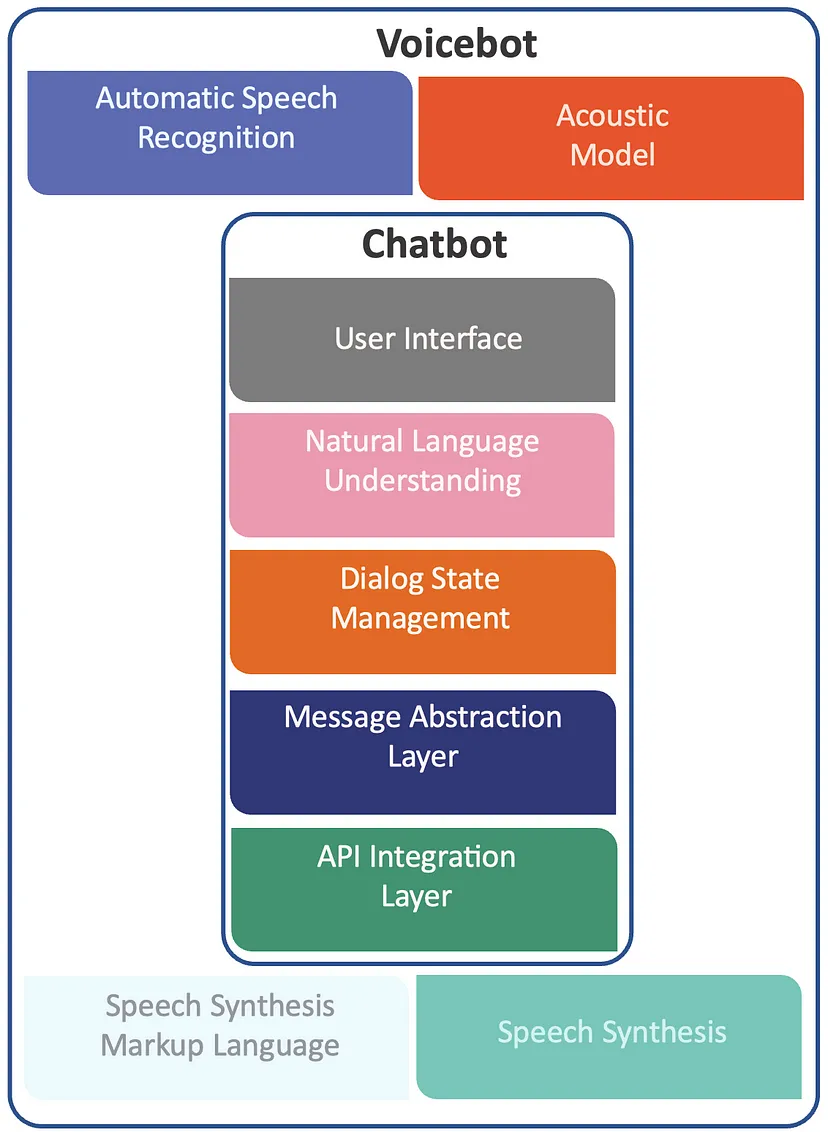
The difference between a Chatbot and Assistant is not always clear, and the terms can be used interchangeably. The easiest way to differentiate between the two is to look at their capabilities - Assistants are typically more advanced than chatbots - ChatGPT + extensions (API Integration Layer).
- Chatbot - a chatbot is designed to handle basic communication tasks. It's programmed to respond to questions with pre-approved answers using scripted decision trees. When a customer enters a query, the chatbot picks up keywords and responds with the most suitable scripted response from its knowledge base. In a lot of cases, chatbots require customers to choose responses from set phrases (e.g. to start the conversation the customer chooses between ‘account’, ‘order’ or ‘billing’), which limits the scope of user input and therefore the questions the chatbot can be asked.
- Assistant - is designed to interact with a customer in a conversational manner. Rather than relying purely on scripted answers, an Assistant uses Machine Learning (ML) and Natural Language Processing (NLP) to understand a customer’s intent and respond in a more personalized, ‘human-like’ way. An advanced Assistant can also ‘remember’ previous interactions, which means it can learn to handle more and more customer queries.
Conversational AI Market Leaders
The market is currently defined by powerful multimodal models that serve as the "brains" for modern assistants:
- OpenAI: o1 and o3 models, focusing on deep reasoning and complex problem-solving.
- Google: Gemini 2.0, emphasizing native multimodal integration and proactive mobile assistance.
- Anthropic: Claude 3.5 and 3.7, known for high-fidelity reasoning and nuanced professional workflows.
Google Surfaces
Google Assistant
- Google Assistant reportedly pivoting to generative AI | Devin Coldewey - techCrunch
- Google Assistant with Bard ... greeted with a pill-shaped menu that offers them the chance to "type, talk, or share a photo."
Google's new AI assistant, Smart Google Expert (SGE), combines features from DeepMind and Google Bard to offer life advice, generate creative ideas, and provide personalized learning. Developed with Scale AI Inc., SGE uses the RT-2 model to understand and act on visual and linguistic cues. This advanced AI tool enhances browsing in Chrome, offers tutoring, and promises ethical AI interactions. Google Assistant can be used to control your smart home devices, get answers to your questions, play music, set alarms, and more. Here are some things you can do with Google Assistant on your SGE Home:
- Control your smart home devices. You can use Google Assistant to turn on and off lights, adjust the thermostat, lock the doors, and more. Just say something like, "Hey Google, turn on the living room lights."
- Get answers to your questions. You can ask Google Assistant questions about the weather, traffic, news, and more. Just say something like, "Hey Google, what's the weather like today?"
- Play music. You can ask Google Assistant to play music from your favorite streaming services, like Spotify, Apple Music, or YouTube Music. Just say something like, "Hey Google, play my workout playlist."
- Set alarms and timers. You can ask Google Assistant to set an alarm for the morning or a timer for cooking dinner. Just say something like, "Hey Google, set an alarm for 7am."
- Get help with everyday tasks. You can ask Google Assistant to help you with things like setting a reminder, creating a to-do list, or finding a recipe. Just say * something like, "Hey Google, remind me to pick up milk on my way home."
To use Google Assistant on your SGE Home, you'll need to set it up first. Here are the steps:
- Download the Google Home app on your phone or tablet.
- Open the Google Home app and create a new home.
- Follow the instructions in the app to set up your SGE Home.
- Once your SGE Home is set up, you can start using Google Assistant by saying "Hey Google" or "OK Google."
Here are some additional tips for using Google Assistant on your SGE Home:
- You can customize your Google Assistant experience by adjusting the settings in the Google Home app.
- You can also use Google Assistant with other devices, like your phone or tablet.
- Google Assistant is constantly learning and getting better, so you can expect new features and capabilities to be added all the time.
Duplex
Duplex is a technology that allows Google Assistant to make phone calls in a natural way, while Duet is an AI-powered collaborator that is available in Google Workspace. It uses a combination of artificial intelligence and machine learning to mimic human speech patterns. This allows Google Assistant to make phone calls to businesses and make reservations or appointments without the person on the other end of the line realizing that they are talking to a machine.
Duet
Google Duet is an AI-powered collaborator that is available in Google Workspace. It can help you with a variety of tasks, including:
- Take notes for you in meetings: Duet AI can listen to your meetings and automatically generate notes. You can then review and edit these notes as needed.
- Generate meeting summaries: Duet AI can also generate summaries of your meetings. These summaries will include the key points of the meeting, as well as any action items that were discussed.
- Create custom backgrounds for your video calls: Duet AI can create custom backgrounds for your video calls. This can help you protect your privacy and add a touch of personality to your calls.
- Analyze data in Google Sheets: Duet AI can help you analyze data in Google Sheets. It can identify patterns and trends in your data, and it can also generate visualizations of your data.
- Write different kinds of creative content: Duet AI can write different kinds of creative content, such as blog posts, articles, and even poems. It can also help you with grammar and spelling.
- Answer your questions in an informative way: Duet AI can answer your questions in an informative way, even if they are open ended, challenging, or strange.
Alexa
With Alexa, you can build natural voice experiences that offer customers a more intuitive way to interact with the technology they use every day 1. Through a voice user interface (VUI), voice services like Alexa can communicate with people in ways that feel effortless, solve problems, and get smarter over time 2. Amazon is also looking to add new AI chatbot technology to Alexa.
Microsoft had a digital assistant called Cortana, but it is no longer seen as a competitor to Alexa or Google Assistant. Instead, Microsoft wants Cortana to be an app that’s everywhere and has already partnered with Amazon to enable Cortana and Alexa integration.
Lex
Solid | Inrupt
- Inrupt ... More control over your data and your own personal artificial intelligence assistant
- The inventor of the web thinks everyone will have their own personal A.I. assistants like ChatGPT | Arjun Kharpal - CNBC]
Solid is a technology for organizing data, applications, and identities on the web. Solid enables richer choices for people, organizations and app developers by building on existing web standards.
Hybrid Assistants
- Toolformer | Meta
- Development ... Notebooks ... AI Pair Programming ... Codeless, Generators, Drag n' Drop ... AIOps/MLOps ... AIaaS/MLaaS
- Generative AI ... Conversational AI ... OpenAI's ChatGPT ... Perplexity ... Microsoft's Bing ... You ...Google's Bard ... Baidu's Ernie
- Let ChatGPT plan your next vacation | Cecily Mauran - Mashable ... Meet your AI travel agent.
- OpenAI launches API that lets developers build ‘assistants’ into their apps | Kyle Wiggers - TechCrunch+ ... Powering the new Assistants API is Code Interpreter, OpenAI’s tool that writes and runs Python code in a sandboxed execution environment. Launched in March for ChatGPT, Code Interpreter can generate graphs and charts and process files, letting assistants created with the Assistants API run code iteratively to solve code and math problems.
🤖 "Hybrid assistants" or "hybrid chatbots" or "models of models" architecture links the assistant to agent(s) when the assistant is unable to answer a user's query, the conversation can be transferred to an software agent or live person to obtain the required information. The goal of this integration is to provide a seamless and efficient user experience, where the assistant can handle simple inquiries and the agent(s) can handle more complex issues to improve user satisfaction. The assistant can interface with the software agent by sending and receiving data between the two systems. The assistant acts as the interface for the user, receiving inputs and providing outputs, while the software agent performs actions based on the information received from the assistant.
Prompt Engineering for Assistants
Customizing AI assistants for professional workflows relies heavily on Prompt Engineering (PE). By utilizing system instructions and persona-tuning, developers can constrain the model's behavior, tone, and domain expertise. This ensures that the assistant acts as a specialized expert (e.g., a legal analyst or medical scribe) rather than a general-purpose chatbot.
Lindy
Lindy is an AI assistant that can help with all your tasks, from calendar management and email drafting to contract sending and beyond.
- Wake up to an inbox with pre-drafted replies, personalized with your voice for each recipient. Simply review, edit if needed, and send — streamlining your email like never before.
- Lindy triages your email; She learns from your inbox and automatically surfaces the highest-priority emails for you.
- Automatic conflict handling
- Contract management
- Meeting note taking; Lindy can join your meetings and take notes for you.
- Summarization; Summarize podcasts, YouTube videos, emails, or web articles.
- Infinite personalization
Building ChatBots