AWS IoT Button
YouTube search... ...Google search
Discontinued --- Amazon Will No Longer Sell Physical Dash Buttons | Lisa Lacy
- Immersive Reality ... Metaverse ... Omniverse ... Transhumanism ... Religion ... Versions of Yourself
- Telecommunications ... Computer Networks ... 5G ... Satellite Communications ... Quantum Communications ... Smart Cities ... Digital Twin ... Internet of Things (IoT) ... Space-based Data Centers
- Amazon Echo is basically a Dash button with speakers | Khari Johnson
- AWS Internet of Things (IoT) Button - Cloud Programmable Dash Button
- AWS IoT Button | Purchase @ Amazon
- AWS Dash Button devices
- Technologies
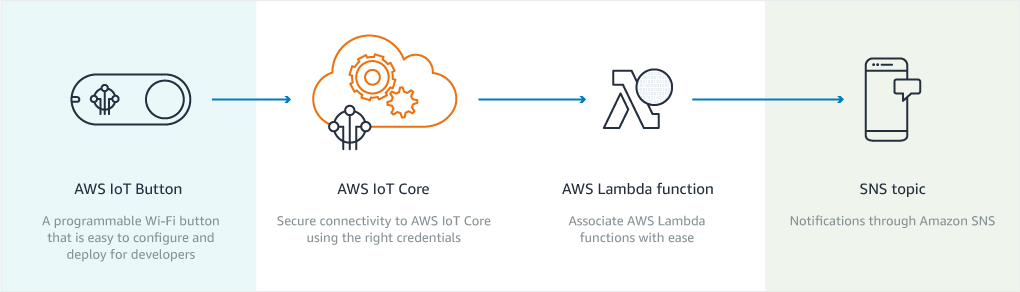
A programmable button IoT 1-Click devoce based on the Amazon Dash Button hardware. You can code the button's logic in the cloud to configure button clicks to count or track items, call or alert someone, start or stop something, order services, or even provide feedback. Using Wi-Fi and Message Queuing Telemetry Transport (MQTT); a lightweight messaging protocol for small sensors and mobile devices, optimized for high-latency or unreliable networks.
For example, you can click the button to unlock or start a car, open your garage door, call a cab, call your spouse or a customer service representative, track the use of common household chores, medications or products, or remotely control your home appliances. The button can be used as a remote control for Netflix, a switch for your Philips Hue light bulb, a check-in/check-out device for Airbnb guests, or a way to order your favorite pizza for delivery. You can integrate it with third-party APIs like Twitter, Facebook, Twilio, Slack or even your own company's applications.
AWS re:Invent 2016: 1-Click Enterprise Innovation with the AWS IoT Button (IOT203)
AWS re:Invent 2016 session on enterprise uses for the one-click AWS IoT Button.
Developing Applications with the IoT Button - March 2017 AWS Online Tech Talks
AWS tech talk from March 2017 on building applications triggered by the AWS IoT Button.
Just got my AWS IoT Button!
The fastest way to start using your AWS IoT Button is to download the mobile app for iOS at App Store or Android at Google Play Store. The mobile app creates the required AWS IoT resources for you, and adds an event source to your button that uses a Lambda blueprint to invoke a new AWS Lambda function of your choice. Blueprints are preconfigured Lambda functions that allow you to quickly connect the click of a button to the functions that fit you best, such as sending automated emails or text messages or deploying other AWS services.
If you are unable to use the mobile apps, follow these Getting Started instructions:
- User Interfaces: Web and Smartphone
- Lambda
- IoT Console - thing Hub
- IoT Dashboard
- Q. My button cannot connect and blinks a red pattern.
- 'Button ConfigureMe' page - Web interface Wi-Fi to IoT Button: https://192.168.0.1/index.html
- VIEW LOG: Put your button into config mode with a 5 second press until it flashes blue
- Bring up list of networks, via icon on Windows taskbar, and find 'Button ConfigureMe ..' network
- Connect to the button's WiFi network (password is the last 8 chars of your button DSN, e.g. 8092R2J5, case sensitive, no spaces) using a laptop or a phone
- Navigate to https://192.168.0.1/devlog in a browser
How to configure an AWS IoT Button
Julien Simon shows how to set up and configure an AWS IoT Button.
AWS IoT Button Wireless Setup
Walkthrough of connecting an AWS IoT Button to Wi-Fi.
AWS IoT Button Applications
How to make a Panic Button with AWS IoT Button
Caroline Dunn turns an AWS IoT Button into a panic button.
Using an AWS IoT button to get your kids to show up for dinner
Julien Simon uses an AWS IoT Button to call the kids to dinner.
How to Write to Google Sheets with AWS IoT Button
Caroline Dunn logs AWS IoT Button presses to a Google Sheet.
Hacking Amazon's Dash Button
Hackster.io shows how to repurpose an Amazon Dash Button for your own projects.
Developing Applications with the IoT Button - 2017 AWS Online Tech Talks
AWS tech talk on building applications with the AWS IoT Button.
IoT (Internet Of Things) Getting Started - Part 2 (Dash Button + Lambda + Elasticsearch)
Part 2 of the AWS IoT series, connecting a Dash Button to Lambda and Elasticsearch.
IoT Button triggers Mobile Phone via Node-red
Uses Node-RED so that an IoT Button press triggers a mobile phone.
AWS iOT Button
Short demo of the AWS IoT Button.
AWS IoT Button Controlling Philips Hue Go Bulb
Demo of an AWS IoT Button switching a Philips Hue Go light.
Amazon IoT button as a home automation controller
Uses the Amazon IoT Button as a home automation controller.
AWS IoT Btton for LIFX In Action
Shows an AWS IoT Button controlling LIFX smart bulbs.
How to Setup TP-Link Smart Switch / Smart Plug with an AWS IoT Button
Caroline Dunn connects an AWS IoT Button to a TP-Link smart plug.
How to Setup AWS IoT Button with Nest Thermostat
Caroline Dunn sets up an AWS IoT Button to control a Nest thermostat.